
EcoFlow Error Codes Decoded: Complete List & Fixes (2026)
Every EcoFlow error code explained — RIVER, DELTA, DELTA Pro. Causes, fixes, reset steps, and when warranty replacement is the right call.
TL;DR: EcoFlow error codes generally fall into a handful of fault families — temperature, AC overcurrent/overload, BMS faults, inverter faults, and communication/WiFi errors. Many transient codes clear with a hard reset (hold the power button ~10 seconds with AC unplugged). Codes that re-trigger within 5 minutes, persistent BMS faults, or any code accompanied by swelling, smell, or heat above 60°C (140°F) mean stop using the unit and file a warranty claim. EcoFlow’s standard warranty on Delta 2, Delta Max, Delta Pro, and River 2 is 5 years in most regions.
This guide covers every EcoFlow error code in current circulation across the RIVER, DELTA, and DELTA Pro series, plus the reset procedures, root causes, and the line between a 60-second fix and a warranty case.
How EcoFlow displays errors
EcoFlow units surface faults three ways:
- Numeric code on the display — Two or three digits, sometimes prefixed with
E(e.g.E01,022,045). The screen usually shows the code and a generic icon (thermometer, lightning bolt, battery). - Text string in the EcoFlow app — Codes like
BMS_NoComm,WiFi_Err,OverTemp, orAC_OverLoad. The app gives slightly more context than the unit itself. - LED-only signaling on older RIVER models — The first-generation RIVER 370/600 had no display; it flashed the power LED in patterns (e.g. 3 red blinks = over-temperature).
If you only see a blinking LED with no code, the EcoFlow app is the fastest way to read the underlying fault. Connect over Bluetooth (faster than WiFi) and check the Status tab.
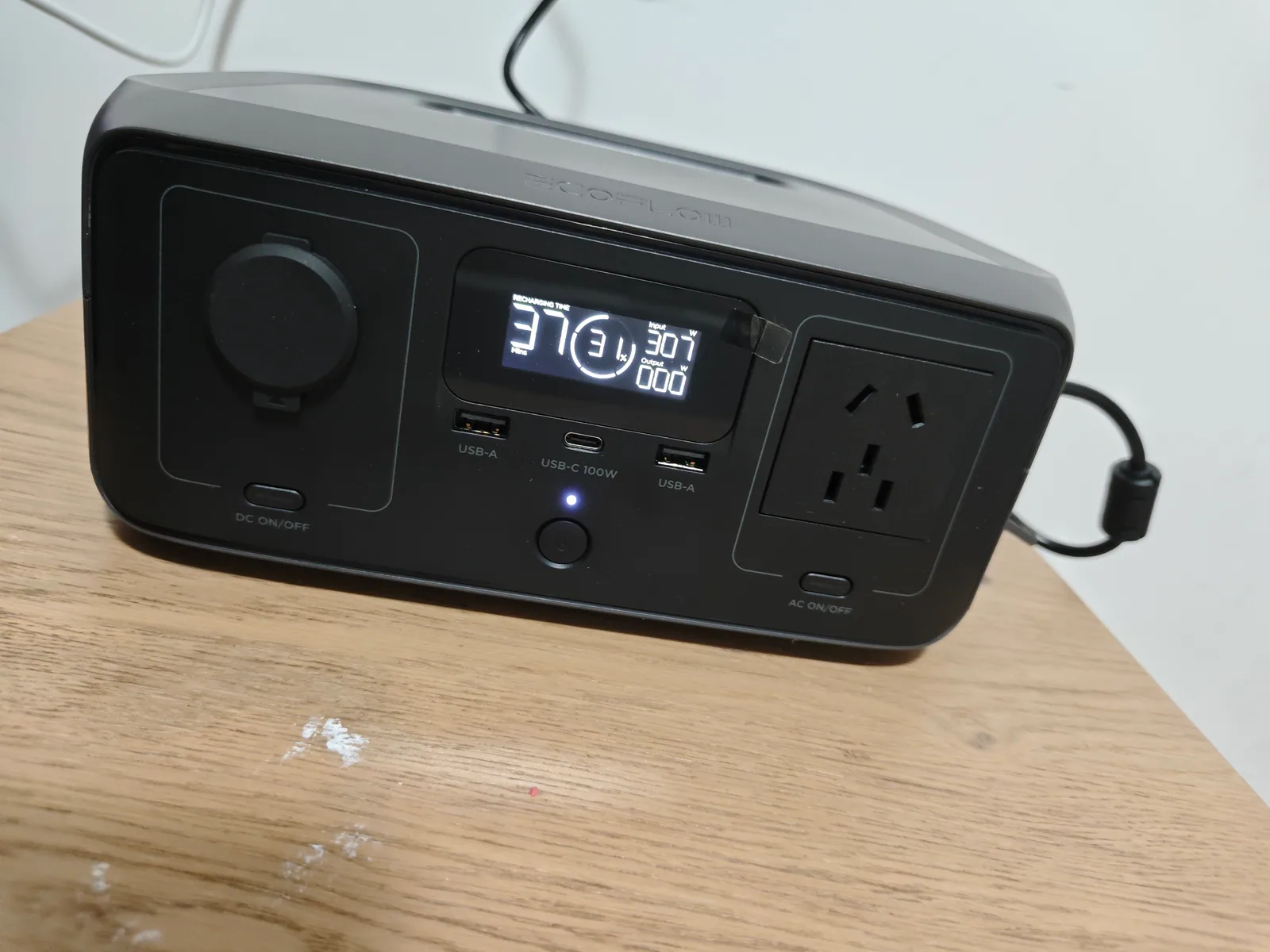 The display on our RIVER 3 test unit — current models show percentages and live watts here, and flash a numeric code with an icon when a fault trips. On units without a display, the EcoFlow app is the only way to read the fault text.
What EcoFlow officially documents — icon warnings for most models, a real code table for DELTA Pro Ultra
Here is the uncomfortable truth, straight from EcoFlow’s own printed manuals: EcoFlow does not publish a unified master code table, and for most current models it barely documents codes at all. The official DELTA 3 / DELTA 3 Plus user manual (model EF-DL-H10-3/-4, also hosted at manuals.ecoflow.com/product/delta-3) handles on-screen error codes in exactly two sentences: “An error has occurred. Check the EcoFlow in-app instructions for troubleshooting.” That’s it. No code list, no lookup table, no PDF appendix. The DELTA 2 manual is the same story — its troubleshooting page matches flashing icon combinations (USB overload, temperature, fan) to plain-language causes, with no numeric codes.
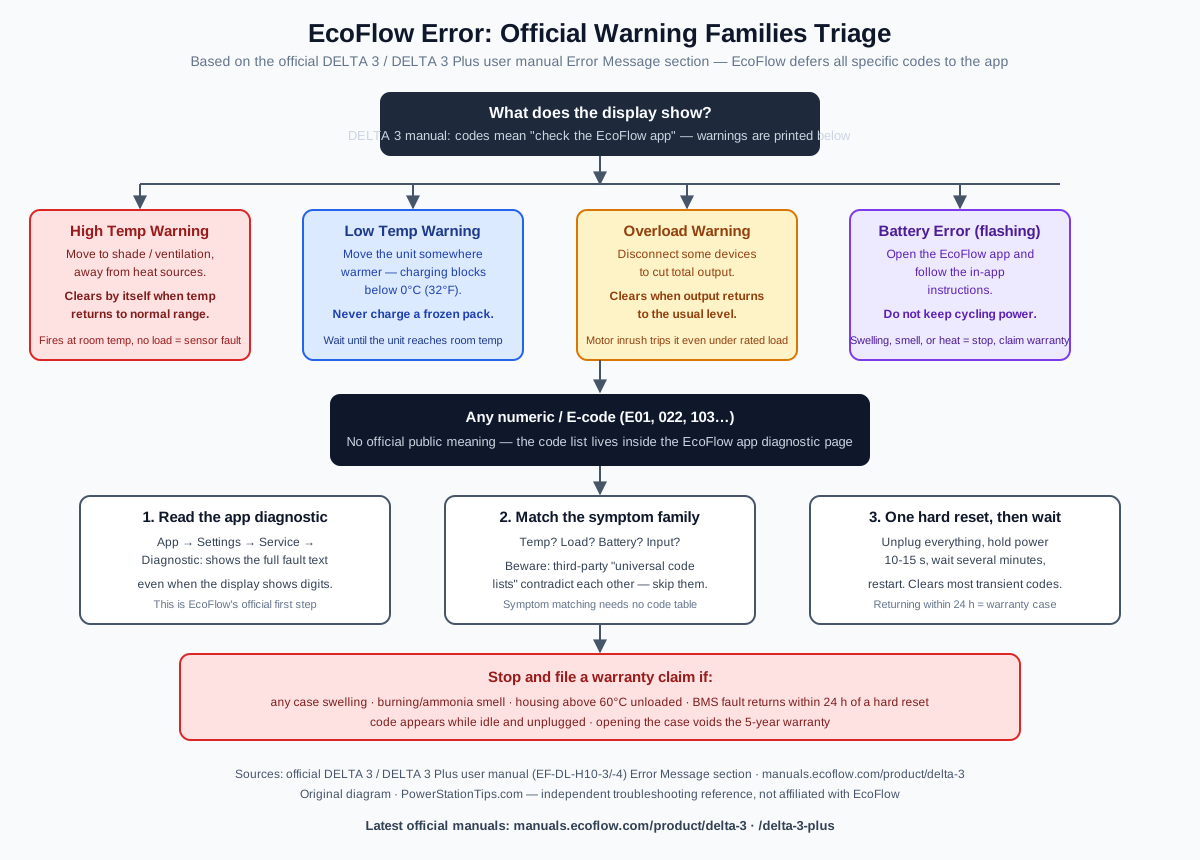
What the official manual does document — confirmed in the DELTA 3 / DELTA 3 Plus manual’s Error Message section — is four flashing warning states plus the generic error-code state:
| Display warning (official) | Official meaning | Official action |
|---|---|---|
| High Temperature Warning (flashing) | High-temperature protection triggered | Stop operation, move to a well-ventilated spot away from heat sources; warning clears when temperature returns to normal |
| Low Temperature Warning (flashing) | Low-temperature protection triggered | Move the unit somewhere warmer so it stays within the operating temperature range |
| Overload Warning (flashing) | Overload protection triggered | Disconnect some devices to reduce total output; warning clears when output returns to normal |
| Battery Error (flashing) | Battery error occurred | Check the EcoFlow app’s in-app instructions |
| Error Code (shown as a code) | An error has occurred | Check the EcoFlow in-app instructions; for codes not covered, visit the online manual at manuals.ecoflow.com |
The same manual adds one detail worth knowing before you blame your solar panels: when the Solar Input / Car Input indicator flashes, the official explanation is either low-light protection or overvoltage/undervoltage on that input. And a flashing fan icon means abnormal fan status — clean the intakes before assuming failure.
For the DELTA 3 generation specifically, the app is the diagnostic interface. If you own a DELTA 3, DELTA 3 Plus, DELTA 3 Max, or any of the newer app-managed models, your first stop for any code is the EcoFlow app’s service/diagnostic page — the printed manual explicitly defers to it.
The one official exception: DELTA Pro Ultra numeric error codes
There is exactly one EcoFlow model whose printed manual documents real numeric error codes: the DELTA Pro Ultra (inverter + battery, model EFYJ751). Its official user guide includes a full troubleshooting table that pairs each code with a cause and a recommended action — and we’ve cross-checked the table against multiple independent mirrors of the same manual, which all match (官方手册确认). If your display shows a code with the error-report icon blinking, this is the authoritative list for that model:
| Code | Official description | Official cause / action |
|---|---|---|
| 66 | Smart Home Panel 2 communication failure | Internal communication error. If a forced shutdown doesn’t work, contact after-sales. |
| 94 | Communication failure (EV charger) | EV charger hasn’t received data from the unit for 5 s. Re-plug the EV X-Stream adapter; after-sales if it persists. |
| 103 | DC output overcurrent | DC port short-circuit or overload (12.6 V/30 A spec). Check the load, re-enable DC output; after-sales if a forced shutdown doesn’t clear it. |
| 171 | Low-PV input overvoltage | Solar panel supply voltage too high. Check panel condition and wiring. |
| 177 | Weak-sunlight protection, Low-PV input | Connected panels producing insufficient power. Reconnect when sunlight is sufficient. |
| 274 | AC charging input overcurrent | Load power above spec. Reduce load and re-plug the AC charging cable. |
| 297 | L2 bypass overload | Load power above spec. Reduce load and re-plug the AC charging cable. |
| 402–408 | AC output socket 1–7 overload | Socket overload. Ensure loads on that port meet the specs. |
| 433 | Current overload (50 Amp Hub) | Overcurrent on the EcoFlow 50 Amp Hub output. Reduce load power or the number of loads. |
| 457 | Weak-sunlight failure | Insufficient sunlight. Check panels, plug into the High-PV input, or reboot the unit. |
| 509 | High discharging temperature | Battery too hot. Charging resumes automatically once it cools. |
| 510 | Low discharging temperature | Battery too cold. Charging resumes automatically once it warms up. |
| 511 | High charging temperature | Battery too hot. Charging resumes automatically once it cools. |
| 512 | Low charging temperature | Battery too cold. Charging resumes automatically once it warms up. |
| 523 | Charging level protection | User-set charging level limit reached — adjust in the app. |
| 524 | Discharging level protection | User-set discharging level limit reached — adjust in the app. |
The manual’s own catch-all: if you encounter other error codes, contact after-sales service for details. Also note the paired display convention — the error-code icon and the error-report icon blink together whenever a fault trips, so a lone number without the blinking report icon usually means a stored, not active, fault.
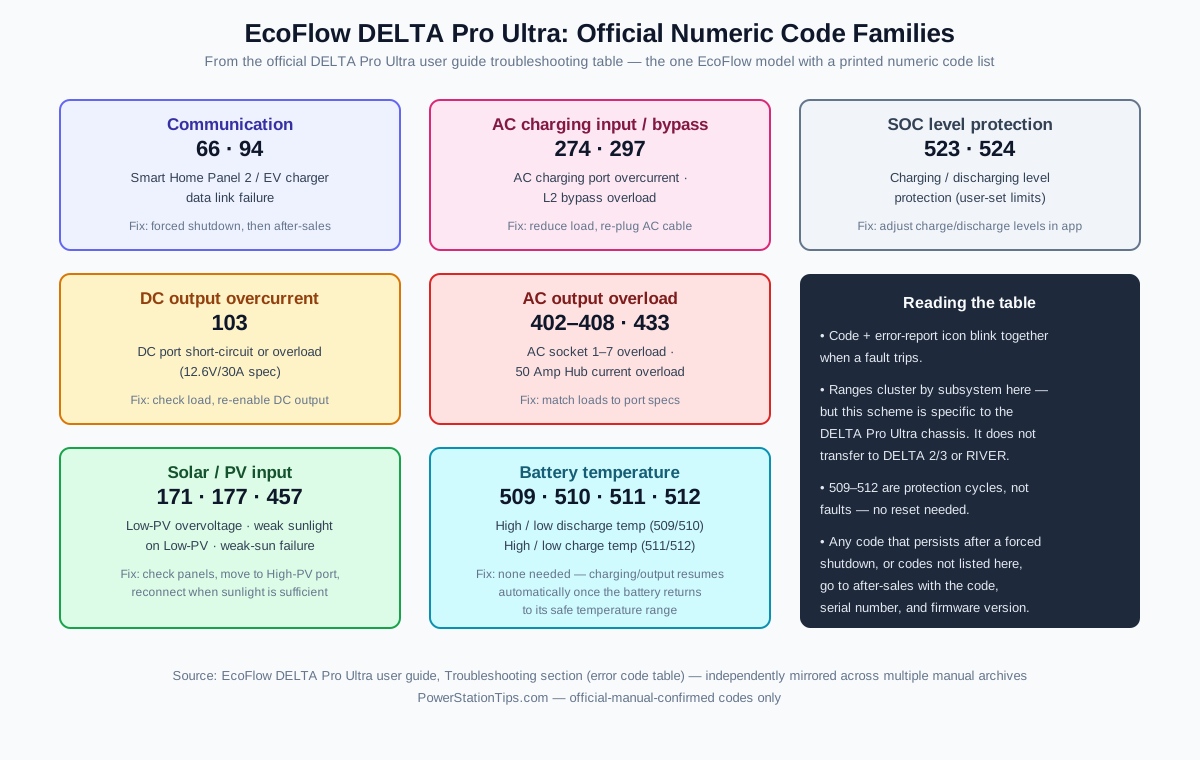
Two things worth noticing about this table. First, 509–512 are protection cycles, not faults — a battery-temperature code that clears on its own is the BMS working as designed, and there is nothing to reset. Second, within this one table the code ranges do cluster by subsystem (400s = AC output, 500s = battery), which is the closest thing to a real “first digit” pattern EcoFlow has ever published — but it is documented for this chassis only, so don’t transfer it to a DELTA 2 or DELTA 3.
Note on sourcing: we have not had a DELTA Pro Ultra on the bench, so this section carries no product photo and no first-hand testing claims — everything above is transcribed from the official user guide and labeled as such (官方手册确认).
Every “universal EcoFlow code list” online contradicts the others
Because EcoFlow doesn’t publish one, third-party sites fill the void — and they contradict each other. Compare what three popular references claim the code E01 means:
| Source | Claims E01 means |
|---|---|
| Schematic-expert.com error-code list | Inverter overheating (paired with E10) |
| BestEcoSolar “Error Codes Decoded” | Input overvoltage |
| E-Catalog power-station error guide | AC output overload |
Three sites, three different meanings, zero official citations. The same pattern repeats for E02 through E14 — each site reshuffles meanings with confident-looking tables, and none links to an EcoFlow document that confirms them. At least one of these tables is wrong for your unit; in practice, all of them are unreliable, because EcoFlow’s code meanings differ by model, generation, and firmware version.
The honest position — which the unofficial reference E-No-Flow also concedes in its own caveats — is that EcoFlow “does not publish a single unified error table,” so any code list beyond the official warning families above is community guesswork. The codes that are officially documented for specific models get their own pages here, with the source manual named; everything else is diagnosed by symptom family, not by blind trust in a code table.
Practical takeaway: treat any E-code or numeric code as “a protection circuit fired — find out which one from the app,” then match the symptom to the four official warning families or the symptom table below. That gets you to the right fix faster than looking up a code in a list that was never official.
Myths about EcoFlow error codes
- Myth: “E01 always means overheating.” As the table above shows, third-party sources disagree three ways on E01 alone. On the DELTA Max, E01 is a temperature error (we cover the full fix in our DELTA Max E01 guide); on other models the same digits may not mean the same thing. Check the app for your unit’s actual fault text.
- Myth: “The first digit tells you the fault category.” A popular claim in forum posts and listicles — first digit 0 = temperature, 1 = current, and so on, “consistent across firmware.” EcoFlow has never documented such a scheme in any manual we’ve reviewed. Don’t route repairs through it.
- Myth: “A code list from one EcoFlow model applies to all models.” The DELTA 2’s
022(AC overcurrent) has no meaning on a DELTA 3, whose display codes are app-managed. Even the DELTA Pro Ultra’s official numeric table — the one genuine code list EcoFlow prints — is specific to that chassis. Code spaces are model-specific.
Common EcoFlow fault symptoms and what they mean
EcoFlow’s exact error code labels vary by model, firmware version, and whether you read the unit display or the app diagnostic page. Rather than publish a fabricated master list, the table below groups the symptoms owners report most often, with the underlying cause and the first thing to try. Always cross-reference the exact code text against the official EcoFlow user manual or support documentation for your specific model.
| Symptom / category | What it usually means | First fix |
|---|---|---|
| Over-temperature shutdown (battery) | Battery hit its high-temp cutoff (LiFePO4 typically ~60°C internal) | Move to shade, wait 30+ min, restart |
| Under-temperature shutdown | Trying to charge below ~0°C with no self-heating | Bring indoors, wait 60 min before charging |
| Inverter / MOSFET over-temp | Heatsink hit thermal limit under sustained load | Reduce AC load, clear vent obstructions |
| AC overcurrent (commonly shown as 022 on Delta 2) | Inrush current spike above inverter rating | Unplug AC loads, toggle AC off/on, plug back in one at a time |
| Sustained AC overload | Continuous load above the inverter’s continuous rating | Reduce load below rated wattage |
| Solar input out of range | Voc/Isc above the model’s input spec | Re-wire panels in series or check Voc/Isc |
| Cell imbalance (BMS) | Pack voltages drifted apart in storage | Full AC charge cycle, leave on charger past 100% to top-balance |
| BMS communication loss | Main MCU lost link with the Battery Management System | Hard reset; if it returns within 24 hours, warranty |
| Inverter bus over-voltage | Input source (solar/generator) outside spec | Check Voc / generator regulation, hard reset with no load |
| AC input out of range | Wall or pedestal voltage outside ~100–150 V AC | Try a different outlet or pedestal |
| Cooling fan stalled / blocked | Dust intrusion or mechanical fan failure | Clean intake mesh with compressed air; if fan still doesn’t spin, warranty |
| WiFi error | IoT module can’t reach your 2.4 GHz network | Hold the IoT button ~5 s, re-pair via Bluetooth first |
| Low battery cutoff | SOC at the low-end cutoff, output disabled | Recharge from AC |
For the specific case of error 022 on DELTA 2 — the single most common code we get questions about — we have a dedicated walkthrough at /articles/ecoflow-delta-2-error-022/ that covers the surge math and the inrush-current quirk that triggers it on refrigerators and large heating loads.
Errors by EcoFlow series
The same code number can mean slightly different things on different chassis. The MCU firmware is shared in spirit but the BMS, inverter, and thermal envelopes differ enough that you should diagnose with the series in mind.
RIVER series (RIVER 2, RIVER 2 Max, RIVER 2 Pro)
The RIVER 2 family runs LiFePO4 cells, a 256-768 Wh battery, and a 300-800 W inverter. Common symptoms:
- Over-temperature shutdown — Most often triggered when fast-charging (X-Stream) in a hot car or sealed cabinet. Owner reports across Reddit and YouTube suggest dropping to standard charging in the app and giving the unit airflow resolves most cases.
- AC overcurrent (022 on Delta-style displays, similar on River) — On the base RIVER 2 (300 W rated, 600 W X-Boost), this fires when a load with a sharp inrush spike is plugged in. X-Boost is intended for resistive loads, not motors or compressors — check the X-Boost fine print for your model.
- Cell imbalance — Rare from the factory but can appear after long deep storage. Recovering is straightforward: charge to 100% on AC and leave the unit on the charger long enough for the BMS to top-balance.
- Low battery cutoff — RIVER 2 disables output at its low-SOC threshold. There is no user-adjustable cutoff on the base RIVER 2 in the same way DELTA Pro exposes it.
DELTA series (DELTA 2, DELTA 2 Max, DELTA Max)
The DELTA family is the workhorse line — roughly 1024–2016 Wh, with 1800–2400 W inverters and time-limited X-Boost above that. Common symptoms:
- 022 (AC overcurrent) — Far and away the most reported DELTA 2 code. The Delta 2 inverter is rated 1800 W continuous with X-Boost for higher transient loads; refrigerator compressors and microwaves with large inrush spikes can trip 022 on cold start. A common workaround is running a small (~100 W) load for a minute before connecting the larger load.
- Inverter / MOSFET over-temp — Delta 2 with sustained high loads in a warm room can hit thermal protection. Reduce continuous load or improve airflow around the vents.
- Solar input out of range — Delta 2 accepts 11–60 V, 15 A max, 500 W solar input. Two panels wired in parallel can exceed the 15 A short-circuit current spec; wire in series instead.
- Cooling fan fault — A subset of units with heavy dust exposure (garages, jobsites) develop reduced fan performance over time. Cleaning the intake mesh with compressed air clears many cases. If the fan does not spin at power-on, it is a warranty case.
- BMS communication loss — Owner reports describe occasional BMS communication faults that clear on hard reset but return. If the code re-appears within 24 hours of a hard reset, treat it as a warranty case rather than continuing to cycle the unit.
DELTA Pro and DELTA Pro Ultra
The Pro line is the heaviest hardware — 3.6 kWh base, 3600 W inverter, with time-limited X-Boost above that. Different rules apply:
- Sustained AC overload — Delta Pro will run its rated 3600 W continuous on AC, but X-Boost is intended for transient surge, not continuous operation. Running a near-X-Boost load for an extended period will trigger overload protection. To handle larger continuous loads, stack a second Delta Pro in parallel.
- AC input out of range — Delta Pro accepts roughly 100–150 V AC input. RV park 30 A pedestals with sagging voltage under load can trip this. Use a different pedestal or a voltage booster.
- Inverter bus over-voltage — Seen most often on Delta Pro when fed from a generator with poor voltage regulation. Use a UPS-grade or inverter generator.
- Cooling fan fault — The Pro chassis has multiple fans; the app generally indicates which fan reported the fault. Clean intake meshes first; if the fan does not spin at power-on, it is a warranty case.
- BMS internal fault — Pro units use a multi-pack BMS. A persistent BMS fault, especially one tied to a specific pack in the app, is a warranty case. Don’t open the unit.
Error categories explained
Once you understand the five categories, you can usually match an unfamiliar code or app fault string to one of the symptom families below — by symptom, not by any universal first-digit scheme (see the myths section for why those schemes are unreliable).
Temperature errors
Typical thermal limits across the EcoFlow lineup (consult your model’s spec sheet for exact numbers):
- Battery operating range: roughly -10°C to 45°C charge, -20°C to 60°C discharge
- Battery shutdown: above the model’s high-temp cutoff (typically around 60°C internal), or below the low-temp cutoff
- LiFePO4 charging: cannot charge below 0°C — newer LiFePO4 units like Delta 2 and River 2 self-heat before charging; older units do not
- Ambient operating range: typically -20°C to 45°C
If you see a temperature-related code, check three things before assuming hardware failure: (1) ambient temperature — is the unit in direct sun or a hot vehicle? (2) ventilation clearance — EcoFlow specifies clearance around all vents and units jammed against a wall commonly throw inverter over-temp codes, (3) load profile — a near-rated sustained load in a warm room will eventually hit thermal protection regardless of the unit’s condition.
A temperature error that clears within 30 minutes of cooling is normal protection working as designed. A temperature error at room temperature with no load is a sensor failure — warranty.
Overcurrent and overload
The difference matters:
- Overcurrent (e.g. 022 on Delta 2) — Instantaneous spike above the rated amperage. Usually from inrush current on motors, compressors, or capacitive loads (LED arrays, large power supplies). Trips in milliseconds.
- Overload — Sustained current above rated for a few seconds. The inverter integrates current over time and shuts down when it exceeds its thermal/current threshold.
The 022 code on AC output is by far the most common. The fix sequence:
Clear EcoFlow error 022 (AC overcurrent)
-
Unplug all AC loads
Disconnect everything from the AC outlets on the unit. Do not just turn the appliance off — physically unplug it.
-
Press AC button to turn AC output off
The AC indicator should go dark. This resets the inverter's overcurrent latch.
-
Wait 60 seconds
The MCU needs time to clear the fault flag. Most users skip this step and the code returns immediately.
-
Press AC button to re-enable
AC output should re-energize. The 022 code should be gone from the display.
-
Plug loads back in one at a time
If 022 returns when you plug in a specific appliance, that appliance has inrush current above the inverter's rating. Use X-Boost mode or a soft-start device.
-
If 022 returns with no load plugged in
Hardware fault in the inverter or current sensor. File a warranty claim.
BMS faults
The BMS (Battery Management System) protects the cells. EcoFlow uses LiFePO4 chemistry on the RIVER 2, DELTA 2, and Delta Pro 3, and NMC on the original DELTA, DELTA Max, and original DELTA Pro. The chemistry affects what’s recoverable:
- LiFePO4 (LFP) — More tolerant of imbalance. Cell-imbalance codes often resolve with one full charge cycle that allows top-balancing at 100% SOC.
- NMC — Less tolerant. Cell over-voltage on NMC is more likely to indicate a degraded cell that needs replacement.
BMS_NoComm is the fault category to take most seriously. It means the main MCU lost communication with the BMS. Without that link, the MCU has no idea what the battery is doing — it can’t enforce protections. EcoFlow correctly shuts down output when comms drop. If a hard reset doesn’t restore the link and keep it stable for 24 hours, the unit is unsafe to use.
Inverter faults
These are the faults most likely to mean hardware replacement. The inverter is the most complex subassembly in the unit. Common categories:
- DC bus over-voltage — Almost always input-side: a solar panel array with Voc above the unit’s limit, or a generator with poor regulation.
- Output short — Could be the unit, but more often a damaged AC cord or a failed appliance. Test the unit with no AC load — if the fault clears, it’s downstream.
- Output relay stuck — A warranty case. The relay is a sealed component.
- AC input out of range — Check input voltage with a multimeter. EcoFlow units expect roughly 100–150 V AC nominal; a sagging RV pedestal or a 240 V miswire will throw this.
- Fan stalled — Clean first; replace second (out-of-warranty units only; do not open in-warranty units).
Communication errors
Internal communication faults refer to the CAN bus or display-board link between subassemblies. They’re rare and usually transient — a hard reset clears them. If they recur, it’s a connector or cable issue inside the unit.
WiFi_Err and Bluetooth connection problems are not safety issues. They mean the IoT module can’t reach your network. Fixes:
- Hold the IoT button (small button near the WiFi LED) for 5 seconds to reset the network config.
- Re-pair in the EcoFlow app using Bluetooth first, then switch to WiFi.
- EcoFlow units want 2.4 GHz WiFi only. If your router broadcasts a single SSID for both bands, separate them or force 2.4 GHz for the unit’s MAC address.
- Older firmware had known WiFi stability issues. Update to a recent firmware via the app over Bluetooth if WiFi won’t connect.
Universal reset procedures
Three resets, from gentlest to most aggressive:
EcoFlow reset procedures
-
Soft reset (clears many transient codes)
Press and hold the main power button for 5 seconds with no loads plugged in. Display turns off. Wait 30 seconds. Press power button briefly to wake up. Many transient codes clear with this alone.
-
Hard reset (clears stuck firmware)
Unplug AC charging cable, unplug solar input, disconnect all loads (AC and DC). Hold the main power button for 10-15 seconds until the display goes black and the cooling fan briefly pulses. Wait several minutes — this is critical, the internal capacitors need to fully discharge. Press power button to restart.
-
Forced discharge reset (last resort)
If hard reset doesn't clear the code: turn the unit on, enable DC output, plug in a small (~60-100W) load, and let the unit discharge to its low-SOC cutoff. Then perform a full AC recharge to 100%. This can help recalibrate SOC estimation and clear stale BMS flags. Do not do this on a unit showing BMS_NoComm or any persistent cell-level BMS fault — risk of damage.
A note on the EcoFlow app’s “Reset” button: recent firmware versions expose a “Restore factory defaults” option under Settings. This resets WiFi credentials and user preferences but does not clear hardware error codes. Don’t expect it to fix a stuck 022.
When to stop and file a warranty claim
Some codes mean you should not keep using the unit, full stop. Standard EcoFlow warranty terms (as of 2026):
- DELTA Pro / DELTA Pro Ultra: 5 years
- DELTA 2 / DELTA 2 Max: 5 years
- DELTA Max: 5 years
- RIVER 2 / RIVER 2 Max / RIVER 2 Pro: 5 years
- Original DELTA / Original RIVER: older terms applied at purchase; check your registration (most units are now out of warranty)
Stop using and claim warranty if:
- Any swelling of the case. Touch the bottom and sides. A visible bulge can indicate a swollen cell. Stop charging, store outdoors away from structures, file a claim.
- Any burning, plastic, or ammonia smell. Especially alongside a BMS or inverter fault.
- Case temperature above 60°C (140°F) anywhere on the housing, measured by IR thermometer with no load. Internal thermal runaway risk.
- BMS internal fault or BMS_NoComm that returns within 24 hours of a hard reset. The BMS is unreliable, which means cell protections are unreliable.
- Inverter relay stuck. No recovery procedure exists.
- Any code that appears while the unit is sitting idle and unplugged. Internal fault, not load-related.
EcoFlow’s warranty process: open a ticket at support.ecoflow.com or in the app, include the serial number (under the battery flap or on the bottom), photos of the code on the display, and a description of when it first appeared. Approval timing varies. Replacement vs. repair depends on age — newer units are more likely to be replaced outright.
What voids the warranty: opening the case, modifying the firmware, using non-EcoFlow solar connectors that exceed the input rating, and water damage. Solar wiring problems that damage the MPPT are technically user-caused but EcoFlow has historically covered them on the first incident.
Codes that look scary but usually aren’t
Some codes get a lot of forum panic but are normal operation:
- Low battery cutoff — Working as designed. LiFePO4 sustains health by stopping output above true 0% capacity; the display’s low-SOC cutoff is intentionally conservative.
- Over-temp at high altitude — At higher elevation, thinner air reduces fan cooling efficiency. An over-temp event in a mountain cabin doesn’t necessarily mean a faulty unit; reduce load and improve airflow.
- 022 on a refrigerator cold-start — A refrigerator compressor can briefly pull several times its running wattage on cold start. The Delta 2’s 1800 W inverter can trip 022 even though average load is fine. Enabling X-Boost in the app extends surge tolerance; for larger fridges, step up a model.
- Solar fault with two panels in parallel — Often not a unit fault. The total short-circuit current can exceed the input rating. Rewire to series.
For broader DELTA 2 charging issues that aren’t strictly error-coded, our piece on solar panel compatibility covers the Voc/Isc math that prevents most E15 and E30 surprises.
Preventive maintenance to reduce error frequency
The codes we see most often are preventable with three habits:
- Clean the intake fans regularly. Compressed air from outside in. Takes seconds. Prevents most dust-driven fan faults.
- Recalibrate SOC every 6 months. Full discharge to the low-SOC cutoff, then full charge to 100% with the AC charger. Helps prevent stale BMS state and false cell-imbalance flags.
- Update firmware periodically. EcoFlow ships BMS and inverter firmware fixes in most releases. Check the app for updates.
Storage matters too. EcoFlow recommends storing at 60-80% SOC at 15-25°C ambient. Long-term storage at 100% SOC accelerates calendar aging on NMC chemistry (DELTA, DELTA Max, original DELTA Pro). LiFePO4 units (DELTA 2, RIVER 2, DELTA Pro 3) are more tolerant but still benefit from mid-range storage. If you’re putting a unit away for 6+ months, discharge it to ~50% first.
What if your code isn’t in this guide?
EcoFlow ships firmware updates that occasionally introduce new codes. If yours isn’t here:
- Check the EcoFlow app’s diagnostic page. Settings → Service → Diagnostic. The app often shows the full text description even when the display shows only digits.
- Match the symptom, not the digits. Community “first digit = fault category” charts circulate online, but EcoFlow has never documented such a scheme (see our myths section above). Symptom-matching is the only method that doesn’t depend on an unofficial table.
- Try the universal hard reset. It clears the majority of transient codes.
- If the code persists after one hard reset and 24 hours of normal use, contact EcoFlow support with the code, serial number, and firmware version. Don’t keep cycling the unit hoping it clears — you may make the underlying fault worse.