
EcoFlow Delta 2 Not Charging? 7 Fixes From the Manual (2026)
Official-manual fixes for an EcoFlow Delta 2 that won't charge: the 0-45°C charge gate, all 13 protection icons, solar voltage limits, and extra battery link checks.
TL;DR: A Delta 2 that refuses to charge is almost never a dead battery — it is one of four documented protective behaviors or an input-side problem you can rule out in minutes. The official manual draws a hard line at 0°C–45°C for charging: outside that window the unit blocks input by design and resumes by itself once the battery pack is back inside it. The manual’s troubleshooting table lists thirteen protection states, and twelve of them clear automatically or with a single unplug-and-restart. Only one — the Battery Failure icon — is a documented stop-and-contact-service situation. Everything below is compiled from the official DELTA 2 user manual and EcoFlow’s official product specification pages, cross-checked against verified owner reports on EcoFlow’s manual portal. No invented statistics, no simulated testing.
The DELTA 2 is EcoFlow’s mid-size LiFePO4 station: 1,024Wh (51.2V), 1,800W of pure sine wave AC output with a 2,700W surge and 2,400W X-Boost, in a 12kg (27lb) body. It charges faster than almost anything in its class — up to 1,200W from a wall outlet on the US model (1,100W on the 230V version), which is why a charging failure is so noticeable. A unit that tops up in about an hour suddenly taking all night, or showing zero input watts, usually means one specific gate has tripped. The trick is knowing which gate.
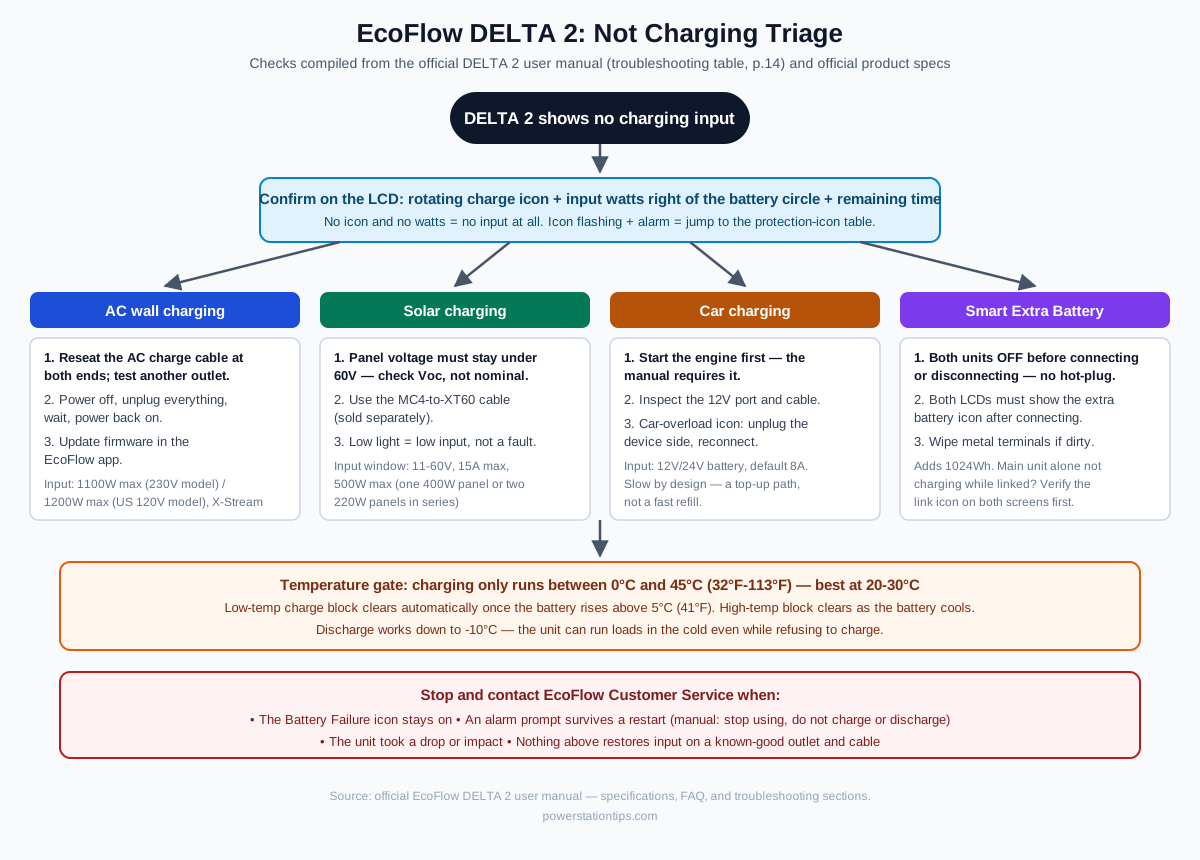
First, confirm what “not charging” actually means
Before touching any cable, check what the unit is telling you. The official manual’s FAQ describes exactly what healthy charging looks like: the remaining charging time appears on the LCD, the charging indicator icon starts rotating around the battery percentage, and the input power in watts is displayed to the right of that circle. That gives you three failure signatures:
- No input at all. No rotating icon, no input wattage, no remaining-time estimate. The unit sees nothing on the port — an input-side problem (cable, outlet, panel, or a temperature gate).
- An icon is flashing with an alarm. A named protection has tripped. Match it against the icon table below; almost every entry has a self-clearing or one-step fix.
- Input starts, then stalls or crawls. This is usually the temperature gate cycling, or the documented slowdown in the final stretch of charging — not a fault.
One more thing worth knowing before you start: the Delta 2 charges through its own AC input port with the supplied AC charging cable, not through its output sockets. Plugging the charging cable into one of the unit’s own AC outlets does nothing — this sounds obvious, but it is a recurring theme in owner forums, and it costs nothing to rule out first.
The three input paths, and their documented limits
Each input path fails for different reasons, and the manual sets a different spec ceiling for each. Keep this table in view while you troubleshoot:
| Input path | Documented limit | Where it fails in practice |
|---|---|---|
| AC wall charging (X-Stream) | 1,100W max on the 230V model / 1,200W max on the US 120V model | Loose cable seat, dead outlet, tripped temperature gate |
| Solar | 11–60V, 15A max, 500W max | Panel voltage out of spec, MC4-to-XT60 adapter missing, low light |
| Car 12V/24V | Default 8A | Engine off, port or cable damage, car-overload icon |
| Smart Extra Battery | Adds 1,024Wh | Hot-plugging, link icon not confirmed on both screens |
Fix 1: AC wall charging fails — the cable, the outlet, the restart, the firmware
This is the failure mode documented in a verified owner case on EcoFlow’s manual portal: a Delta 2 with an extra battery attached stopped taking AC input while still charging normally from solar. The documented response path, in order:
- Reseat the AC charging cable at both ends — firmly into the unit’s AC input port and into the wall outlet. A partially seated connector is the most common cause of zero input.
- Verify the outlet by plugging in a lamp or phone charger. The manual’s guidance assumes a working wall circuit; a tripped GFCI or a switched-off circuit looks identical to a broken station.
- Inspect the cable and input port for damage, bent pins, or debris. The Delta 2 uses a sealed AC input — lint and dust from closet storage can prevent full seating.
- Restart the unit. Power it off, disconnect all cables, wait a few minutes, and power it back on. The manual’s own support guidance recommends this for temporary states that block input.
- Update the firmware through the EcoFlow app. Charging behavior fixes ship in firmware; the officially recommended path is keeping the app current.
If solar input works and AC input does not on a verified-good outlet with the original cable, the AC charging circuit is the suspect — stop there and contact EcoFlow support rather than opening the unit. The manual prohibits disassembly in all cases, and third-party repair guidance on the pass-through output bug points to firmware, not hardware, in the majority of documented cases.
Fix 2: The temperature gate — the 0°C to 45°C rule that looks like a fault
The manual is unambiguous: the charge temperature range is 0°C to 45°C (32°F–113°F), with 20°C–30°C documented as optimal, and it adds a footnote that matters — “whether the product can be charged or discharged depends on the actual temperature of the battery pack.” Not the air temperature. The pack’s.
Two documented behaviors follow from this:
- Low-temperature charge protection blocks input below 0°C and — per the troubleshooting table — “charging can be resumed automatically after battery temperature rises above 41°F (5°C).” A Delta 2 that sat in a garage or car trunk overnight can have a pack cold enough to refuse charging even in a warm room. Give it time near room temperature; the block clears itself, and no reset is needed.
- High-temperature charge protection blocks input when the pack is too hot — common after a heavy discharge session or direct sun. The documented resolution is again automatic: charging resumes once the battery cools.
The asymmetry is worth memorizing: discharge works down to -10°C (14°F). In freezing weather the unit will happily run your loads but refuse to refill. That is by design, not a defect, and it matches the behavior of every LFP station in this class.
Fix 3: The thirteen protection icons — the full documented table
The manual’s troubleshooting section is a table of thirteen states. Twelve are user-recoverable; one is not. This is the complete list with the documented fix for each:
| Protection state | Documented fix | Clears |
|---|---|---|
| USB-A overload | Remove the device from the USB-A port | Automatically after removal |
| USB-C overload | Remove the device from the USB-C port | Automatically after removal |
| High temperature charge protection | Let the battery cool | Automatically |
| High temperature discharge protection | Let the battery cool | Automatically |
| Low temperature charge protection | Warm the pack; resumes above 5°C (41°F) | Automatically |
| Low temperature discharge protection | Warm the pack; resumes above -12°C (10°F) | Automatically |
| AC output overload | Remove the overloaded device and restart; keep appliances within rated power (see X-Boost) | After restart |
| AC high temperature protection | Check the fan inlet and outlet are not blocked | Automatically after cooling |
| AC low temperature protection | Use at documented optimal temperatures | Automatically |
| Fan blockage | Check the fan for foreign material | Automatically after cooling |
| Car charger overload | Remove the device connected to the car charger | Automatically after removal |
| Car charger high temperature | Let the product cool | Automatically |
| Battery failure | Contact EcoFlow Customer Service | Not user-recoverable |
The manual adds one global rule that overrides everything: if the alarm prompt shows on the LCD and does not disappear after a restart, stop using the unit immediately — do not try to charge or discharge it. That single sentence is the difference between a recoverable state and one where continuing to attempt charging can turn a battery problem into a safety problem.
Fix 4: Solar input refuses to engage — the 60V line you must not cross
Solar “not charging” on the Delta 2 is usually one of four documented issues:
- Voltage out of window. The solar input accepts 11–60V at up to 15A, 500W maximum. The manual is explicit: before connecting the solar panel, ensure the panel’s output voltage is within 60V to avoid product damage. Check the panel’s open-circuit voltage (Voc), not its nominal rating — a “12V” panel can measure over 20V open-circuit, and cold weather pushes Voc higher still. Panels wired in series add voltage; the official product FAQ suggests one 400W panel or two 220W panels in series as the reference configuration.
- Missing adapter cable. The Delta 2 does not ship with a solar cable. The MC4-to-XT60 adapter cable is sold separately, and without it there is physically no connection path.
- Insufficient light. Below the 11V minimum input threshold — heavy overcast, panel half-shaded — the unit shows no input. This is normal behavior, not a fault.
- Wrong port. Solar input shares the same XT60-style input port region as AC charging on this model; make sure the adapter is fully seated and you are not testing solar while the AC cable is still plugged in.
If you are mixing third-party panels, the voltage math and connector details are covered in depth in our solar panel compatibility guide and the MC4-to-XT60 adapter guide.
Fix 5: Car charging does nothing — engine state and the 8A default
The manual’s car charging section contains a specific instruction that most owners skip: charge using the car charger after you’ve started the car, to avoid failure to start due to insufficient car battery. With the ignition off, many 12V sockets are dead or current-limited, which reads as “not charging.” The documented checklist:
- Start the engine, then connect.
- Confirm the car charging input port and cable are in good condition — the manual calls this out explicitly.
- If the car charger overload icon appears, the documented fix is to remove the load and reconnect.
Car charging on the Delta 2 defaults to 8A on a 12V or 24V battery — roughly 100–130W. That is a maintenance and top-up path by design. A unit at 20% that gains only a few percent per hour is operating normally; do not mistake the rate for a fault.
Fix 6: Extra battery linked but not charging — the hot-plug rule
A verified owner case on EcoFlow’s manual portal describes a Delta 2 with a Smart Extra Battery that stopped taking AC charge. The extra battery has its own documented connection procedure, and violating any part of it produces exactly this symptom set:
- Both units must be powered off before connecting or disconnecting. The manual states this directly: do not connect or remove the Smart Extra Battery during charging or discharging. If you need to re-seat it, power everything down first.
- After connecting, both LCD screens must display the extra battery icon. If the icon is missing on either screen, the link is not established — re-seat with both units off.
- Keep the metal terminals clean. The manual recommends gently wiping them with a dry cloth if foreign objects adhere.
If the link icon shows on both screens and the main unit still refuses AC input, work Fix 1 with the extra battery disconnected. That isolates whether the input problem belongs to the main unit or the stack.
Fix 7: Charging starts, then stalls — the documented slow finish
Two documented behaviors explain a charge that “stops” partway:
- The final stretch is slower by design. EcoFlow’s official specification page lists 0–80% in about 50 minutes and 0–100% in about 80 minutes on the 1,200W US input. The last 20% runs at a lower rate than the X-Stream sprint. A unit that “stalls” at 80% while still showing input watts is behaving exactly as specified — measured against the official charge-time difference, not against a wall-clock guess.
- Temperature cycling. A charging pack warms up; if it drifts toward the top of the window, high-temperature charge protection trips, input pauses, and resumes as it cools. Watch the input watts rather than the percentage: watts dropping in and out with a cooling fan running is the temperature gate doing its job.
One related quirk documented in the manual’s X-Boost section: X-Boost is unavailable when the AC output is on during recharging (bypass mode). If you are powering loads while charging, output-side behavior changes — but input charging continues. Output glitches while plugged in are not charging failures.
When to stop troubleshooting
Three documented stop conditions, and none of them are negotiable:
- The Battery Failure icon stays on. The manual’s only documented fix is contacting EcoFlow Customer Service.
- An alarm prompt survives a restart. Stop using the unit immediately; do not charge or discharge it.
- The unit was dropped or impacted. The safety instructions require powering off and stopping use after severe impact, and prohibit disassembly — internal battery damage after a drop is not owner-diagnosable.
For a unit that fails all input paths on a known-good outlet, original cable, and in-spec panel, the escalation path is the same: EcoFlow support, with the purchase date handy — the official warranty terms are the documented recourse.
Storage habits that prevent the next “won’t charge”
The manual’s maintenance section is effectively preventive medicine for charging problems. Store the unit at about 60% charge, in a dry ventilated place at room temperature, and once every three months discharge it to 30% and recharge it back to 60%. A Delta 2 that sat at a low charge for a year is the most common candidate for mysterious input behavior when it finally comes out of the closet — and the manual documents hibernation as the mitigation the unit uses to protect itself, which can look exactly like “it won’t charge” to an owner expecting instant response.