
Jackery F9 Error: USB & 12V Output Fault Fix (2026)
Jackery F9 is a DC output fault. Why the 12V socket's 10A/120W limit matters, why non-original cables trip USB, and how to clear F9 in minutes.
TL;DR: F9 is the DC output overcurrent / short circuit code — the manual ties it specifically to USB short-circuit protection, while Jackery’s support articles treat it as covering both the USB ports and the 12 V car socket. This is the easiest Jackery code to clear and the least likely to be a hardware fault: remove the device from the affected port and the unit recovers. The two things to check are whether the device is within the port’s rating, and whether you are using the original cable.
How this page is sourced: the port ratings, the cable advice and the reset gesture are quoted from Jackery’s F9 help-centre articles and the Explorer 1500 / 2000 Pro manual table. We do not hold these units on a bench, so nothing here is presented as our own measurement.
What F9 actually means
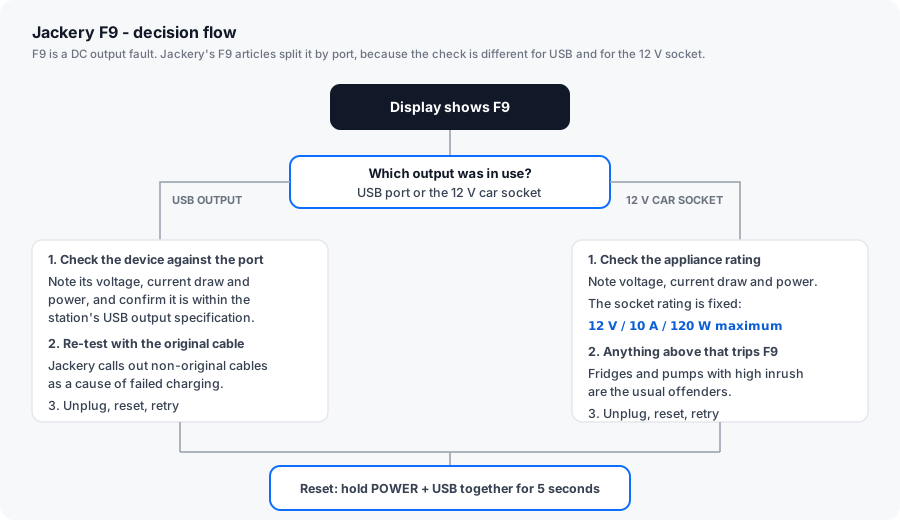
The manual’s F9 entry is short: DC output overcurrent / short circuit, described as USB short-circuit protection triggering. Jackery’s help centre widens it to two scenarios, and the distinction is the whole point of this page:
| Port | Fixed rating Jackery quotes | Typical cause of F9 |
|---|---|---|
| USB output | Per-port, per the unit’s spec sheet | Faulty or non-original cable; a device that does not conform to the port’s output spec; a short in the device side |
| 12 V car socket | 12 V / 10 A / 120 W maximum | An appliance whose draw or inrush exceeds 120 W, or that does not conform to the socket spec |
The 120 W figure is the one that catches owners out. A 12 V car socket is not a 12 V “anything goes” outlet — a portable fridge, an air pump or a tyre inflator can each exceed 120 W on startup.
The fixes, in the order Jackery lists them
Clear a Jackery F9 error
-
Note which port was in use
Was the device on a USB port or on the 12 V car socket? Jackery's F9 article splits into those two branches, and the check is different for each. The branch you are in determines the next two steps.
-
Check the device against the port rating
For the car socket, Jackery quotes a fixed 12 V / 10 A / 120 W maximum, and asks you to note the appliance's voltage, current draw and power consumption. Anything at or above that ceiling, including on startup, will trip F9. For USB, confirm the device conforms to the station's USB output specification.
-
Re-test with the original cable
Jackery explicitly names non-original cables as capable of causing failed charging on the USB ports. Swap to the cable the device shipped with and test the port again on its own.
-
Unplug the device, then reset
Remove the device from the affected port and hold POWER and USB together for 5 seconds on most Explorer units - Pro-series models use DISPLAY and USB for 10 seconds and show 8888. The screen blinks off and relights with the battery percentage. Jackery lists this reset for F9 on both branches.
-
Reconnect one device at a time
Plug the single device back in and watch the display. If F9 returns immediately with that one device, the device or its cable is the cause. Move it to a different port to separate a port fault from a device fault.
-
Escalate if F9 fires with nothing connected
An F9 that reappears with no load on any DC port points to a fault on the DC output board. That is a warranty matter rather than something you service yourself.
What usually causes it
| Cause | Fixable by you? | Notes |
|---|---|---|
| Third-party or damaged USB cable | Yes | Jackery names non-original cables as a cause. Swap to the original. |
| Device draws more than the car socket’s 120 W | Yes | Check the appliance label, and remember startup draw is higher than running draw. |
| Device does not meet the USB output spec | Yes | Some devices negotiate outside the standard. Test on another port or another charger. |
| Cable short inside the connector | Yes | Inspect the plug for bent pins, lint or corrosion. |
| Port damage | No | Warranty case if the unit is covered. |
| DC output board fault | No | Warranty case. |
Is this a replacement-part situation?
No. There is no consumable part here. Jackery does not sell replacement DC output boards or USB modules for Explorer units, and the ports are not designed for owner replacement.
What is worth replacing is on your side of the port: the cable, and the appliance you were powering. The useful diagnostic is the swap test — same device, different port; then same port, different device. That single pair of tests separates the four possible culprits (cable, device, port, board) in about two minutes.
If F9 keeps returning on a port with the original cable and a device that is comfortably within the rating, open a warranty claim. Jackery’s standard cover is 36 months, extended to 5 years on most Explorer models if the product is registered.
Why F9 is worth understanding even if it clears fast
Two Jackery codes are designed to clear without a support ticket. F6 is the other one, and it needs hours of cool-down. F9 is the one that clears in minutes — which makes it tempting to ignore.
The reason not to ignore it is the pattern it reveals. An F9 that appears every time you plug in the same appliance is telling you that appliance sits outside the socket’s rating, and continuing to run it through the socket will keep tripping protection. That is a signal about your load plan, not just a transient glitch.
Related reading: Jackery Error Codes F0–F9, Jackery F6 (inverter / AC output), Jackery F7 (solar input).