
Jackery F6 Error: Causes, Cool-Down Times & Fix (2026)
Jackery F6 means inverter failure. What the manual and Jackery's help centre each say, how long to let the unit cool, and when F6 is a warranty case.
TL;DR: On a Jackery Explorer, F6 is an inverter-side fault. The manual names four things that trip it: AC output overcurrent, overload or short circuit; grid input out of range; inverter over-temperature; and insulation detection failure. It is one of only two Jackery codes designed to clear without a support ticket — but it needs time, not force: unplug the AC load, let the unit rest about two hours to cool fully, then reset. If F6 fires while charging, Jackery asks you to confirm mains voltage is above 200 V and to allow about four hours of cooling.
How this page is sourced: every cause and every timing below is quoted from Jackery’s own documentation — the F6 help-centre articles and the corrective-action table printed in the Explorer 1500 and 2000 Pro manuals. Nothing here comes from a unit we put on a bench, because we do not hold test hardware for these models. Where a claim comes from a third party rather than Jackery, it is labelled as such.
What F6 actually means
The Jackery manual’s full F6 entry is the longest in the table, because F6 is a bucket for four different protection events:
| Trigger | What happened |
|---|---|
| AC output overcurrent / overload / short circuit | A connected appliance pulled more than the inverter’s rating, or a fault in the wiring or the appliance itself |
| Grid input over/under-voltage, over/under-frequency | The wall supply the unit was charging from was outside spec — this variant appears during charging |
| Inverter over-temperature protection | The heatsink reached its thermal limit under sustained load, or the vents were obstructed |
| Insulation detection failure | The unit detected a leakage/insulation problem on the AC side |
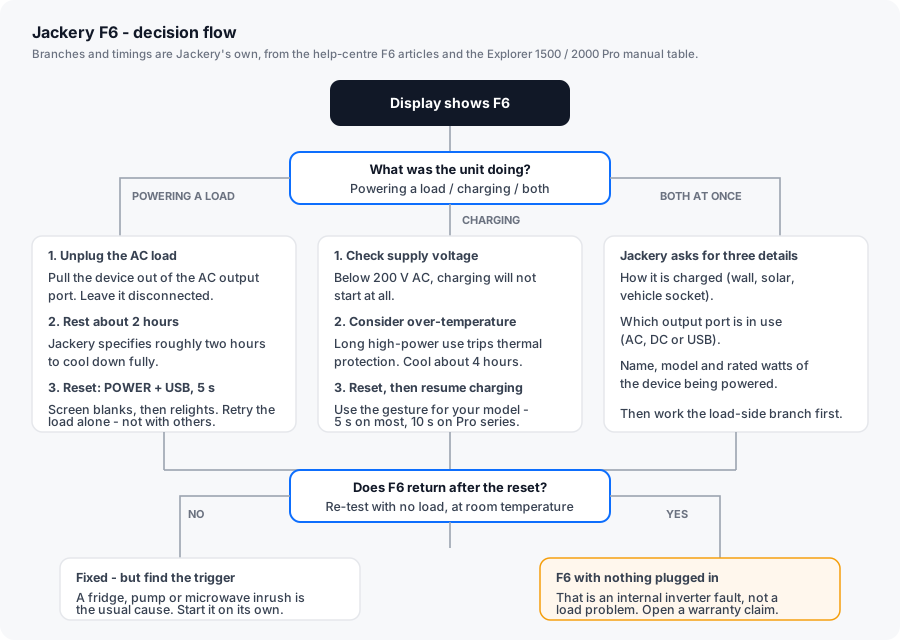
Because four different things raise the same code, the code alone does not tell you which one you have. The scenario does: F6 while powering something is usually an overcurrent or thermal event; F6 while charging is usually a supply-voltage or thermal event.
The fixes, in the order Jackery lists them
The manual prints five corrective steps for F6, and the help centre adds scenario-specific detail. Run them in this order — the sequence matters, because resetting before the unit has cooled simply re-raises the code.
Clear a Jackery F6 error
-
Identify the scenario
Was the unit powering an appliance, charging, or both at once? Jackery's help-centre article splits its guidance on exactly this question, and the recovery time differs between branches. Note the answer before you touch anything.
-
Check the mains voltage if it happened while charging
Jackery states that if household supply voltage falls below 200 V, charging will not initiate at all. Voltage that sags under load - lights flickering elsewhere in the house is the tell - is a common trigger. Try a different circuit before assuming a fault.
-
Unplug the AC load and check ventilation
Pull every device off the AC outputs. The manual asks you to confirm the air intake and exhaust vents are clear, with roughly 30 cm of clearance on both sides of the unit. Move it out of direct sunlight and away from ambient heat.
-
Let it cool for the time Jackery specifies
Powering a load: about two hours, which Jackery describes as long enough to cool down fully. Faulting during charging: about four hours before you attempt a reset and resume charging. Do not shorten this - the protection is thermal, and the temperature has to actually fall.
-
Reset, then re-test with one appliance
Hold POWER and USB together for 5 seconds on most Explorer units; on Pro-series units hold DISPLAY and USB for 10 seconds and check for 8888 on the display. Then plug in a single appliance and watch it. Add loads one at a time rather than all at once.
-
Escalate if F6 returns with nothing connected
An F6 that reappears with no load attached and no heat involved is an internal inverter fault, not a load or environment problem. That is a warranty case - stop cycling the unit and open a support ticket with a photo of the code and the serial number.
The usual triggers, and which are fixable
| Trigger | Fixable by you? | Notes |
|---|---|---|
| Appliance inrush on cold start | Yes | Fridges, pumps and microwaves draw several times their running wattage for a fraction of a second. Start them on their own, then add other loads. |
| Sustained load above the inverter rating | Yes | Check the appliance’s faceplate wattage against the unit’s continuous AC rating, not its surge rating. |
| Blocked vents | Yes | The manual’s 30 cm clearance figure is not decorative. Units crammed against a wall or run in a closed cabinet raise thermal faults. |
| Direct sun or high ambient temperature | Yes | A unit in a hot vehicle or a sunlit truck bed can trip thermal protection even at moderate load. |
| Mains below 200 V while charging | Yes | Move to a different circuit. |
| Insulation failure | No | An internal condition. Warranty case. |
| Inverter fault with no load | No | Internal. Warranty case. |
Is this a replacement-part situation?
Usually not, and this is where F6 differs from the advertising-driven advice you will find on other code pages. F6 is a protection trip, not a consumable failure. There is no fuse, filter or cable the owner is expected to swap. Jackery does not sell inverter modules to consumers.
Two exceptions are worth naming, because they are genuinely user-side:
- The appliance, not the power station. If F6 only ever appears with one specific device, the problem travels with that device. Test it on a wall outlet or a different unit before blaming the power station.
- The charging cable or the adaptor. If F6 appears only while charging on AC, and a different circuit fixes it, the fault was the supply — not the unit.
If F6 recurs on a unit that is cool, unloaded and on a known-good circuit, the answer is a warranty claim rather than a part. Jackery’s standard cover is 36 months, extended to 5 years on most Explorer models if the product is registered. Units bought from Jackery’s own site, Jackery-branded third-party stores or authorised local dealers are covered; keep the receipt, because it establishes the start date.
Why this page exists
F6 is the code Jackery documented most heavily — its help centre carries separate branches for F6 while powering a device, while charging, and while doing both. That level of documentation is the best public signal of how much of a support load a code creates, and it is why F6, F7 and F9 each have their own page on this site while F0, F1 and F2 are covered on the main Jackery error code list.
Related reading: Jackery F9 (DC output / USB short), Jackery F7 (solar input), and the complete Jackery troubleshooting guide.