
Jackery F7 Error: Solar Input Fault, Causes & Fix (2026)
Jackery F7 is the PV charging module fault. Why weak sunlight raises it, the 60 V DC input ceiling behind most faults, and how to clear a stuck F7.
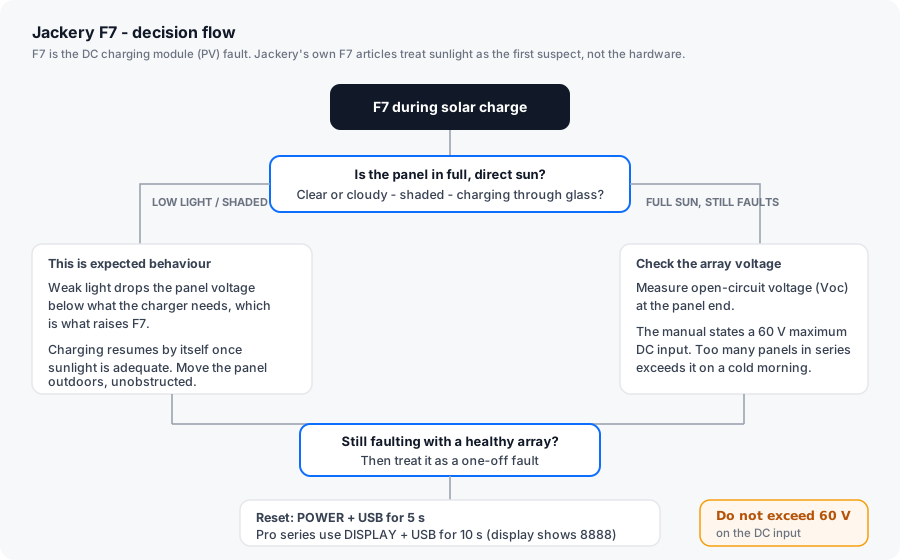
TL;DR: F7 is the DC charging module (PV) failure code. Jackery’s own articles treat it as a sunlight problem first and a hardware problem second: if light is weak or the panel is shaded — or you are trying to charge through glass — the panel voltage drops below what the charger needs, and F7 is what you see. Charging resumes by itself when adequate sun returns. The manual adds the hard number owners should check: 60 V maximum DC input. Too many panels in series can exceed that on a cold, bright morning.
How this page is sourced: causes and steps are quoted from Jackery’s F7 help-centre articles and the corrective-action table in the Explorer 1500 and 2000 Pro manuals. We do not hold these units on a bench, so nothing here is presented as our own measurement.
What F7 actually means
The manual’s F7 entry covers three distinct events, all on the input side:
| Trigger | What happened |
|---|---|
| PV input overvoltage | The solar array’s open-circuit voltage (Voc) exceeded the unit’s DC input rating |
| DC charging module over-temperature | The MPPT charging module got too hot, usually from sustained full-power solar input in a hot environment |
| DC charging module output overcurrent | The module’s output-side current protection tripped |
Notice what is not in that list: a dead panel, a broken cable, or a failed unit. Jackery’s support articles reinforce this by opening the F7 branch with three questions about sunlight, not about hardware.
The fixes, in the order Jackery lists them
Clear a Jackery F7 error
-
Check the light before the hardware
Jackery's F7 article asks three questions: is the weather clear or overcast, is any part of the panel shaded, and are you charging through glass? Any of the three can drop panel voltage below the threshold the charger needs. Move the panel outdoors, unobstructed, in direct sun and watch whether charging resumes on its own.
-
Disconnect all DC inputs
The manual's first corrective step is to remove every DC input from the unit. Do this before changing anything on the array - it clears any latched input fault so the next test is clean.
-
Measure the array open-circuit voltage
With the array disconnected from the unit, measure Voc at the panel end with a multimeter. The manual states the maximum permitted DC input voltage is 60 V. Panels wired in series sum their voltages, and crystalline silicon Voc rises as temperature falls - a string that measures safe at 25 C can climb past the limit on a cold morning.
-
Rewire if you are over the ceiling
If Voc exceeds 60 V, reduce the number of panels in series or move to a series-parallel configuration with an MC4 Y-branch. Also check the panels' combined short-circuit current against the unit's input rating, because the same mistake can trip the module's output overcurrent protection.
-
Restart and leave it idle
The manual's final step is to restart the unit and keep it idle, waiting for the fault to disappear rather than immediately pushing a load onto it. Most Explorer units reset with POWER and USB held for 5 seconds; Pro-series models use DISPLAY and USB for 10 seconds and show 8888 on success.
-
Escalate only if F7 survives all of that
F7 that persists in full sun, within the voltage limit, with no shading and after a reset points to the charging module itself. That is not a field-replaceable part on Explorer units - open a support case with a photo of the code and your array's measured Voc.
Why Voc and not the panel’s rated voltage
This is the single most common misunderstanding behind F7, and it is worth stating plainly.
A panel rated “200 W, 20 V” does not present 20 V to the charger. That figure is the maximum-power voltage (Vmp) under standard test conditions. The number that matters for protection limits is the open-circuit voltage (Voc), which is higher than Vmp — and it rises as cell temperature falls. Manufacturers quote a temperature coefficient for this, typically a small negative percentage per degree Celsius.
The practical consequence: an array you tested in a warm garage in June can measure meaningfully higher on a frosty morning in January. If your string’s cold-morning Voc is anywhere near the 60 V figure in the manual, wire one panel fewer in series.
Our solar panel compatibility guide walks the Voc and Isc arithmetic through in full, including how to size a series-parallel switch.
The usual triggers, and which are fixable
| Trigger | Fixable by you? | Notes |
|---|---|---|
| Overcast sky or low sun angle | Yes | Charging resumes by itself. Nothing is broken. |
| Shading across part of the array | Yes | Partial shading is worse than full shading on series strings - one shaded panel throttles the whole string. |
| Charging through glass | Yes | Window glass cuts the irradiance enough to drop the input below threshold. |
| Array Voc above 60 V | Yes | Rewire. Check on a cold morning, not a warm afternoon. |
| DC charging module over-temperature | Yes / No | Usually environmental - reduce input and improve airflow. If it recurs in cool conditions, it is internal. |
| DC charging module output overcurrent | Partly | Often a shorted or water-ingressed MC4 connector. Inspect and reseal the connections. |
| Internal module failure | No | Warranty case. |
Is this a replacement-part situation?
Mostly no. F7 is the code where the “buy a replacement part” instinct is most often wrong, because the fault usually sits outside the power station — in the sun, the shading, or the array wiring. Jackery does not sell the DC charging module as a consumer part for Explorer units.
The genuinely user-serviceable items are the ones on the DC side:
- MC4 connectors. Crimped replacements are a common source of reversed polarity and intermittent contact. Re-check the polarity and the crimp before you assume a module fault.
- Extension cable. Long, thin-gauge solar extension runs drop voltage under load. Shorten the run or thicken the conductor.
- Panel wiring configuration. Series versus parallel is a user decision, and it is the decision that determines whether you sit near the 60 V limit.
If F7 appears in full sun, within the voltage ceiling, after a reset, on a unit with a known-good panel, the answer is support rather than a part. Jackery’s standard cover is 36 months, extended to 5 years on most Explorer models when the product is registered.
Related reading
- Jackery Error Codes F0–F9: the complete list — every code, one table.
- Solar panel compatibility guide — the Voc and Isc maths that prevents most F7 events.
- Jackery F6 (inverter / AC output) — the other “it looked like a hardware fault” code.