
How Long Will a Power Station Run a TV and Router?
A 55-inch LED TV plus Wi-Fi router draws only ~120W. Runtime math for 256-3,840Wh stations, the hidden quick-start standby drain, and how to size for outages.
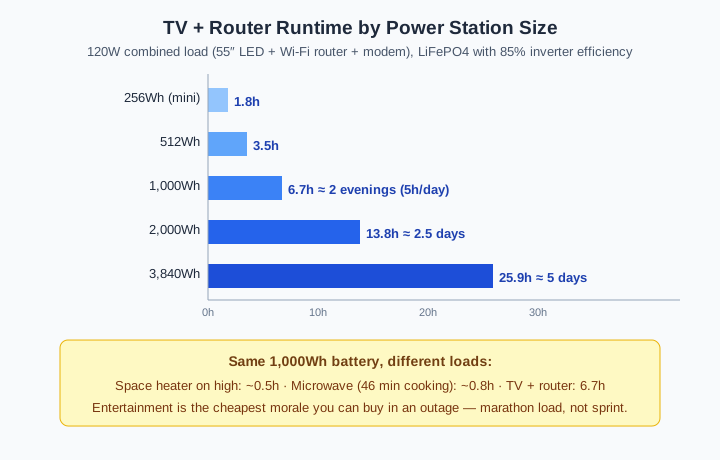
The short answer: longer than almost anything else you can plug in — this is the marathon load of an outage, not the sprint. A typical 55-inch LED TV draws about 100W and a home Wi-Fi router plus modem adds another ~20W, so the whole information-and-entertainment stack runs on roughly 120W. A 1,000Wh power station (about 808Wh usable after inverter losses) keeps that stack alive for ~6.7 hours of continuous viewing — or, measured the way people actually watch during a blackout, roughly two evenings of 5-hour viewing with the router running around the clock. Step up to a 2,000Wh unit and you cover ~2.5 days; a 3,840Wh whole-home unit stretches to ~5 days. Compare that with a space heater, where the same 1,000Wh battery dies in half an hour, and the conclusion writes itself: keeping the TV and internet alive costs a fraction of what keeping warm does, and it buys the two things people miss most in an outage — information and morale.
This page runs the honest math: what modern TVs actually draw (medians from the ENERGY STAR certified television database, not guesswork), the small army of network gear that rides along with the TV, the runtime formula, hour-by-hour runtime for every common battery size, and the one hidden drain — quick-start standby — that can quietly eat your battery with the screen supposedly off. This is part of our running “how long will it run” series alongside the microwave, the chest freezer, and the full runtime data table.
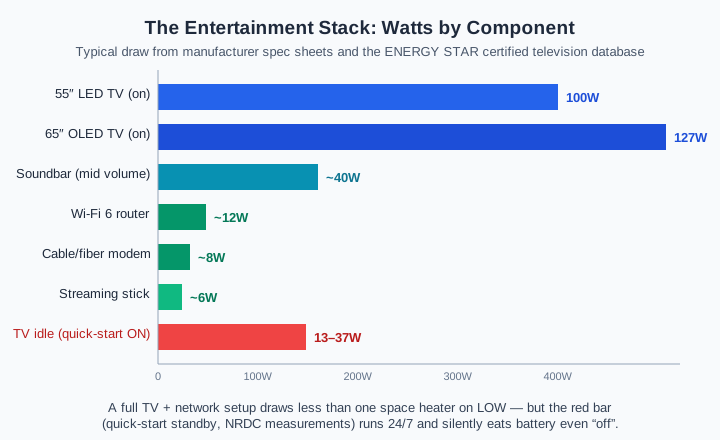
The one setting to change before an outage: modern TVs ship with a “quick start” or “instant on” mode that keeps parts of the set awake so it boots in seconds. Field measurements collected by the NRDC found idle TVs drawing 13W on average with some quick-start configurations pulling up to 37W around the clock. That is a router’s worth of power going nowhere. Switch the TV to deep standby (or pull the plug) when the screen isn’t actually on, and your entertainment runtime jumps measurably for free.
What a TV actually draws (by size and panel type)
Unlike a refrigerator compressor or a microwave magnetron, a television is the honest appliance in the room: the watts on the spec sheet are the watts it pulls, continuously, whenever the screen is on. There is no 3-7× startup surge worth planning for, no hidden input-vs-output rating gap like the microwave’s cooking-wattage illusion. That makes TV runtime the most predictable math in this entire series.
The figures below are medians for current ENERGY STAR–certified televisions, compiled from the ENERGY STAR certified product database — which means they describe efficient modern sets; an older plasma or a misconfigured brightness setting will run hotter:
| Screen size | LED / QLED (median) | OLED (median) | Old plasma (avoid) |
|---|---|---|---|
| 32″ | ~32W | — | — |
| 43″ | ~62W | — | — |
| 50″ | ~65W | — | — |
| 55″ | ~96–102W | ~103–124W | 280–400W |
| 65″ | ~119W | ~127–149W | 400–500W |
| 75″ | ~140–148W | — | — |
| 85″ | ~181W | — | — |
Sources: ENERGY STAR certified television database medians (2025–2026 models); plasma figures from pre-phase-out manufacturer documentation. Three practical takeaways fall out of this table. First, panel technology matters less than people assume — a 65″ OLED draws only ~10–25W more than a same-size LED, and OLED’s per-pixel lighting actually saves power in dark, cinematic content. Second, size is the real lever: every step up the ladder adds 11–33W, so an 85″ home-theater monster costs nearly six times what a bedroom 32″ does. Third, if your outage plan includes a television that predates the LED era, the plasma’s 280–400W draw is quietly the second-biggest load in the house — moving the blackout plan to any modern LED multiplies TV runtime four-fold before the battery even enters the picture.
Brightness settings shift these numbers too: a set running vivid/sports mode near max backlight can draw 20–40% above its rated figure, while a dimmed night-mode session can come in under it. For planning purposes, take the median figure and add a 25% cushion rather than pretending the number is exact.
The network stack: router, modem, and the rest
The TV never travels alone. Every outage plan that includes a screen also includes the small fleet of boxes that feed it — and while each one is tiny, they share a trait the TV doesn’t: they run 24 hours a day, whether or not anyone is watching. That duty-cycle difference is why the network stack deserves its own line in the budget.
| Component | Typical draw | Duty cycle |
|---|---|---|
| Wi-Fi router (dual-band, Wi-Fi 6) | 8–15W (high-end tri-band: 20–35W) | 24h |
| Cable / DSL / fiber modem | 5–20W | 24h |
| Mesh Wi-Fi node (each) | 5–15W | 24h |
| Streaming stick (Roku / Fire TV / Apple TV) | 2–10W | While watching |
| Soundbar (mid volume) | ~20–50W | While watching |
| Game console (in gameplay) | ~100–200W per manufacturer specs | While playing |
Figures are typical ranges compiled from manufacturer spec sheets and ENERGY STAR small-network-equipment data; check the power-adapter label for your specific unit. A standard setup — one dual-band router, one modem — lands around 20W combined and burns roughly 480Wh per day just existing. Add two mesh satellite nodes for a bigger house and the network alone crosses 700Wh/day, which is more than the TV itself consumes at 5 hours of evening viewing. The power-adapter trick is worth knowing: the wall-wart’s label (say, 12V × 2A = 24W) states the maximum, and actual draw typically runs 40–60% of that — so a 24W-rated router realistically sips 10–14W.
One more distinction matters for outage planning: the router is the load you keep even when you abandon the TV. A phone charged from the same power station plus a live router means maps, news, weather alerts, and messaging stay up all night for ~20W. Plenty of households that “lose the TV” on day two of an outage are really just reallocating the same battery from 100W of screen to 20W of connectivity — and the runtime math below shows exactly what each reallocation buys.
The runtime formula
Same derating chain as the rest of this series, applied to the combined continuous draw:
Runtime (hours) = (Battery Wh × 0.95 × 0.85) / Total load watts

  0.95 = LiFePO4 usable-capacity factor
  0.85 = inverter conversion loss (AC output)
Worked examples for the standard 120W stack (55″ LED at ~100W + router and modem at ~20W):
- 1,000Wh LiFePO4 station: 808Wh usable ÷ 120W = ~6.7 hours continuous
- 512Wh compact station: 422Wh ÷ 120W = ~3.5 hours
- 2,048Wh station: 1,655Wh ÷ 120W = ~13.8 hours
Since nobody watches TV for 6.7 hours straight in a blackout — and the router never sleeps — the more honest unit is days, using a realistic viewing pattern. The next section does that arithmetic, and you can run your own screen size and network gear through the Runtime Calculator.
Runtime by power station size — continuous vs. real viewing days
Two ways to read the same table. Continuous hours answer “movie night”: how long the stack runs with the screen on the whole time. Viewing days answer the outage question: a 5-hour evening viewing session plus the router’s 24-hour draw (~500Wh + ~480Wh ≈ 980Wh/day, rounded to ~1,000Wh/day for the standard stack).
| Battery | Usable Wh | Continuous @120W | Viewing days (~1,000Wh/day) | Router-only days (~480Wh/day) |
|---|---|---|---|---|
| 256Wh mini | ~211 | 1.8h | 5h (one evening) | 10h |
| 512Wh | ~422 | 3.5h | half a day | ~21h |
| 1,000Wh | ~808 | 6.7h | ~1 day | ~1.7 days |
| 2,000Wh | ~1,655 | 13.8h | ~2 days | ~3.4 days |
| 3,000Wh | ~2,478 | 20.7h | ~2.5 days | ~5 days |
| 3,840Wh | ~3,109 | 25.9h | ~3 days | ~6.5 days |
The router-only column deserves a second look, because it reframes the whole purchase decision. At ~20W, even a 512Wh compact station keeps a home network alive for the better part of a day, and a 2,000Wh unit covers three-plus days of internet — while a single evening of big-screen viewing consumes what the router sips over two days. Households that prioritize information over entertainment can stretch a mid-size battery across an entire multi-day outage by simply cutting screen time after day one. The math rewards the triage most outage guides never spell out.
The hidden drain: quick-start standby runs 24/7
Here is the failure mode specific to this load class. Every other appliance in the series draws power while it works; the TV is the rare one that can draw meaningful power while doing nothing at all. NRDC field measurements in Northern California homes found televisions idling at 13W on average — and “quick start” modes on some models hold up to 37W around the clock so the set wakes in a couple of seconds instead of ten.
Put those numbers in outage terms: a 37W standby drain is nearly 900Wh per day — almost the entire usable capacity of a 1,000Wh station, spent powering nothing but a faster boot animation. On day two of an outage, when the battery inexplicably dies overnight despite “we only watched two hours,” this is the usual suspect.
The fix costs nothing and takes thirty seconds per TV:
- Disable quick start / instant on in the TV’s settings menu (often under General → System or Power & Energy).
- Or power the TV through a switched power strip and flip it fully off when the screen is dark.
- Leave the router and modem on the power station continuously — they have no such trap, and their 20W is the cheapest connectivity on the market.
Viewing patterns matter more than screen size
Continuous-hour tables treat every watt-hour as equal, but real outage evenings are burst-shaped, and the burst shape favors entertainment loads. A household that watches 2 hours in the morning and 3 in the evening consumes ~500Wh of TV time per day — but between sessions, with the TV in true deep standby (~0.5W per ENERGY STAR passive-standby limits), the only meaningful draw is the router. That gap between watching draw and idle draw is the difference between the quick-start trap above and a disciplined setup, and it routinely doubles real-world runtime versus the naive continuous math.
The same logic extends to what’s on the screen. A streaming stick adds 2–10W; a game console in gameplay can add 100–200W — more than the TV itself — per manufacturer specifications. A blackout movie night (TV 100W + stick 6W) runs the stack at ~106W; a blackout gaming night (TV 100W + console ~180W) triples the load to ~280W and cuts every runtime figure in the table above to under half. Households planning around a console should size from the console, not the TV: it is the largest item in the entertainment stack by a wide margin.
And for the RV / camping use case where this search often lands: tailgating and campsite setups typically run a smaller screen (32–43″, 30–62W) with a streaming stick, totals of 40–70W — which a 512Wh station serves for a full weekend of evening viewing. The 1,000Wh units in this size class are comfortably oversized for entertainment alone, which is exactly why they pair so well with also running a cooler or fridge at the same time.
Sizing picks and the mistakes to avoid
Because the load is small, inverter output is a non-issue for this use case — even the smallest 200–300W stations can supply 120W with room to spare. Every sizing decision here is about Wh, and three mistakes account for nearly all the bad outcomes:
- Mistake 1: forgetting the network stack. Budgeting 100W for the TV and nothing for the router, modem, and mesh nodes understates the true 24-hour load by ~480Wh/day — half a mid-size battery, invisible until it isn’t.
- Mistake 2: leaving quick-start on. As computed above, up to ~900Wh/day of pure waste. This single settings toggle is worth more runtime than a whole extra 512Wh of battery.
- Mistake 3: oversizing for entertainment alone. A 3,840Wh unit runs the standard stack for three viewing days — but if entertainment is the only goal, a 1,000Wh class station covers a typical 1–2 day outage evening-for-evening. The big batteries earn their keep by also serving the microwave, freezer, and furnace blower; entertainment is the garnish, not the meal.
For most households the decision collapses to two options: a 1,000Wh-class station (EcoFlow DELTA 2, Anker SOLIX C1000, Bluetti AC180 — all 1,800W+ continuous, all LiFePO4) for evening entertainment plus day-scale router duty in short outages, or a 2,000Wh+ unit when the outage plan also includes refrigeration and heat. All brands in this space publish detailed capacity and output specifications in their official documentation; entertainment loads sit so far below their inverter limits that any of them runs this stack without breaking a sweat.