
Anker SOLIX C1000 Gen 2 Error Codes & Fixes (2026)
The official error code list for the Anker SOLIX C1000 Gen 2 (A1763): all 10 codes E0003-E0036 explained, with BMS temperature windows and proven fixes.
TL;DR: The Anker SOLIX C1000 Gen 2 (model A1763) is the only SOLIX model whose official user guide includes a numeric error code appendix — ten codes, E0003 through E0036, covering USB port faults, overload/short-circuit shutdowns, a car-socket voltage fault, four BMS temperature protection codes, and AC output overload. Four of the ten codes are temperature-related, which tells you where this model actually breaks in the field: a C1000 Gen 2 charging in an unheated garage in winter or sitting in a hot car trunk in summer will trip long before anything is mechanically wrong. Every code in this guide is reproduced from the official A1763 user guide (官方手册确认) — beware third-party “universal Anker code lists,” which do not come from Anker documentation.
The C1000 Gen 2 is the 2026 revision of Anker’s most popular mid-size power station. It keeps the class-defining specs owners care about — 1,024Wh LiFePO4 capacity, 2,000W AC output with L+N+PE grounding, dual 140W USB-C ports, 10ms UPS switching, and a 5-year warranty — and adds faster 1,200W standard / 1,600W UltraFast AC input. Because it replaced the original C1000 (A1760/A1761, 1,056Wh) in Anker’s current lineup, most firmware-era troubleshooting knowledge floating around forums mixes the two generations. This page separates them: Gen 2’s diagnostic layer is numeric and officially documented, while Gen 1’s manual is FAQ-style with no code table at all.
Want to estimate charging time or runtime for your exact setup first? Use the solar charge time calculator — it accounts for real-world losses.
How the C1000 Gen 2 reports faults
Three layers, in order of usefulness:
- On-screen error codes. When a fault trips, the LCD shows an E-number code (E0003–E0036). This is the fastest path to a diagnosis because the official guide documents every code with its meaning and the recommended user action. When a code appears, note which port was in use and what the unit was doing — charging, discharging, or idle — before you clear anything.
- The Anker app. Over Wi-Fi or Bluetooth, the app shows input/output power, battery level, and operating mode, and it keeps a fault/event history that Anker support will ask you to export if the problem escalates. If you can’t connect the app, fix connectivity first — the log matters for warranty claims.
- Behavioral symptoms without a code. A unit that won’t accept AC input, stops charging at a certain percentage, or shuts outputs off silently usually has a root cause the code system flags only intermittently. The C1000 charging problems guide covers the six most common charging-specific causes in depth; this page stays focused on the codes themselves.
A practical note before the table: most of these codes are protection states, not equipment failures. The BMS (battery management system) is doing its job when it cuts a port that’s out of spec. The correct response to eight of the ten codes is to correct the external condition — the load, the cable, the temperature — not to open anything up.
The official error code table (E0003–E0036)
The official A1763 user guide’s appendix lists every code with its trigger condition and the recommended action. The table below reproduces all ten codes 官方手册确认 (official Anker SOLIX C1000 Gen 2 user guide, “Appendix — Error Code” section), then groups them by subsystem with more context.
| Code | Official meaning | Official solution |
|---|---|---|
| E0003 | USB-A port voltage above 5.7V or below 3.8V | Plug the USB-A device in again, or short-press the car socket button |
| E0008 | Charging current for the device on the 15W USB-C port exceeds 3.8A | Plug the USB-C device in again, or short-press the car socket button |
| E0009 | Overload or short circuit in connected devices/cables shut the output down | Disconnect, then replug the devices on the USB-C ports |
| E0010 | Overload or short circuit in connected devices/cables shut the output down | Disconnect, then replug the devices on the USB-C ports |
| E0014 | Car socket voltage above 14.4V or below 10.4V | Press the car socket button again after 30 seconds |
| E0027 | BMS charging temperature above 136.4°F / 58°C | Stop using the unit until temperature is below 131°F / 55°C |
| E0028 | BMS charging temperature below 35.6°F / 2°C | Stop using the unit until temperature is above 37.4°F / 3°C |
| E0032 | BMS discharging temperature above 145.4°F / 63°C | Stop using the unit until temperature is below 140°F / 60°C |
| E0033 | BMS discharging temperature below –2.2°F / –19°C | Stop using the unit until temperature is above 1.4°F / –17°C |
| E0036 | AC port output power exceeds about 2,000W | Keep the connected device under 2,000W and press the AC output button again |
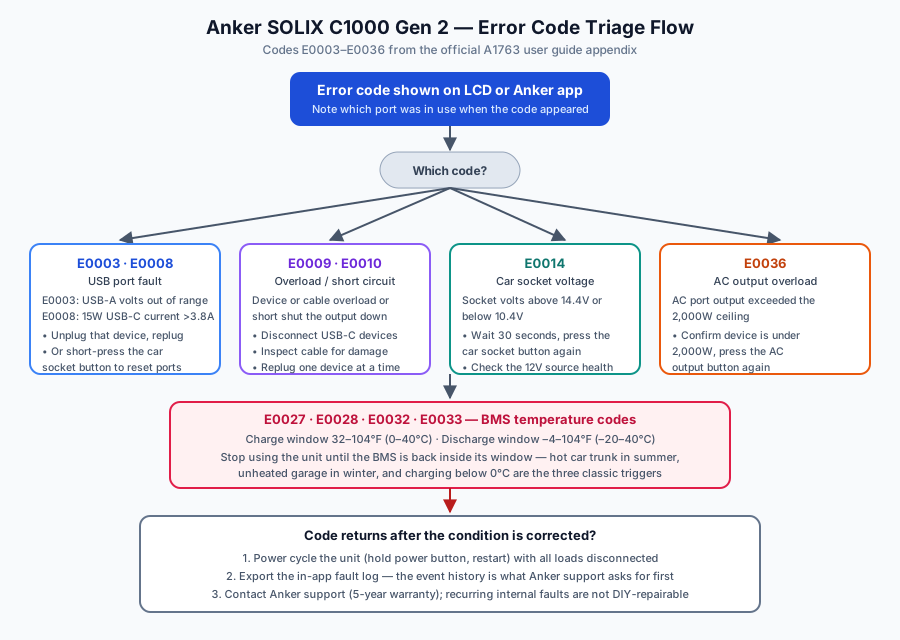
Notice the shape of this table: six of the ten codes are output-port protections (USB-A, USB-C, car socket, AC), and four are temperature protections. There are no codes for inverter hardware failure, cell imbalance, or firmware corruption in the official list — those failure modes exist on any LiFePO4 unit, but Anker’s user-facing code system doesn’t name them. If a unit fails in a way no code describes, that’s an escalation to support, not a DIY diagnosis.
USB port codes (E0003, E0008, E0009, E0010)
These four codes cover the low-voltage output bank, and they share a signature: the fault is almost always in the connected device or its cable, not in the power station.
E0003 (USB-A voltage out of range). The official spec window is 3.8–5.7V. A reading outside that window means the port’s protection circuit saw something it didn’t like — typically a damaged cable with an intermittent short, a cheap adapter-dongle drawing irregular current, or a device with a degraded charging IC that negotiates voltage erratically. Unplug the device, inspect the cable for bends or exposed wire, and replug. The short-press of the car socket button that the official guide recommends is the model’s universal way of resetting the DC output group, since the car socket, USB-A, and USB-C ports sit behind the same button-controlled rail.
E0008 (15W USB-C overcurrent). This one trips on the first USB-C port — the 5V/3A (15W max) port — when a device draws more than 3.8A from it. The most common cause is plugging a high-draw device into the wrong port: modern phones and tablets can pull 3A+ at 5V during fast-charge negotiation, and if the device or cable mis-negotiates and stays at 5V while demanding more current than the port allows, E0008 fires. The fix is to move the device to USB-C port 2 or 3, which support up to 140W each. This is a port-mismatch problem, not a defect.
E0009 / E0010 (overload or short circuit, USB-C). These are the same condition reported on two separate port controllers — the official guide treats them identically: disconnect everything, then replug devices one at a time. If the code fires immediately with nothing connected, the cable or port itself is suspect; try a known-good cable. If it fires only with one specific device, that device (or its cable) has a genuine overload or short condition. Chain-feeding a daisy-chain of USB hubs through one port is a classic trigger.
Practical sequence for all four codes: unplug everything from the USB bank → inspect cables → replug the lowest-draw device first → confirm stable output for a minute → add devices back one at a time. If E0003 or E0008 returns with a known-good cable and device, and the car-socket-button reset doesn’t clear it, the port hardware needs a warranty claim.
Car socket voltage fault (E0014)
The car socket outputs 12V at up to 10A (120W). E0014 trips when the socket voltage drifts above 14.4V or below 10.4V — outside what the official guide considers a healthy 12V rail.
The interesting thing about E0014 on a power station (as opposed to in a car) is that the “12V source” is the C1000 Gen 2’s own DC-DC converter. So an out-of-range reading generally means one of three things:
- A large load just disconnected (voltage spike). Inductive loads like compressors and fridges can create a transient overvoltage when they cut out. The 30-second wait the official guide recommends exists precisely so the rail settles before you re-enable it.
- A marginal or damaged socket, plug, or cable. Corroded plugs and loose center pins cause erratic readings. Try the device in the 12V socket of an actual car — if it behaves there, the issue is the station’s socket or the plug fit.
- Sustained overload. A 10A-rated rail feeding more than that will sag below 10.4V under heavy load. Devices that “work” in a car but trip E0014 on the station are often drawing borderline current the car’s alternator-backed rail tolerated but the station’s regulated rail does not.
If E0014 recurs with no load attached and after multiple 30-second resets, stop using the socket and contact Anker support — a rail that reports out-of-range voltage with nothing connected points to the converter, which is not user-serviceable.
BMS temperature codes (E0027, E0028, E0032, E0033)
Nearly half the official code table is temperature protection, and that’s the most useful diagnostic insight on this page: on the C1000 Gen 2, environmental temperature is the number-one reason a unit throws a code in normal ownership.
The official operating windows:
| Mode | Official window | Trip code (high) | Trip code (low) |
|---|---|---|---|
| Charging | 32°F to 104°F (0°C to 40°C) | E0027 above 58°C BMS temp | E0028 below 2°C BMS temp |
| Discharging | –4°F to 104°F (–20°C to 40°C) | E0032 above 63°C BMS temp | E0033 below –19°C BMS temp |
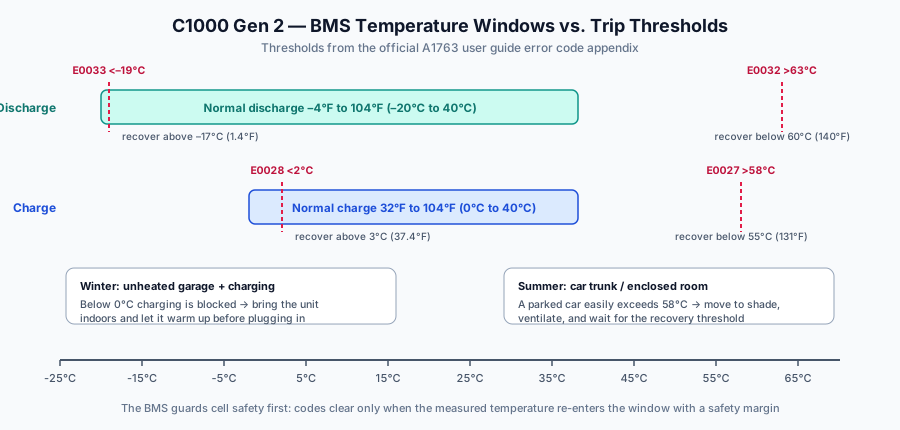
Three details worth internalizing:
The trip thresholds are tighter than the spec windows — on purpose. Charging trips at 58°C, well below the 104°F (40°C) ambient spec ceiling, because BMS sensor temperature runs above ambient when the unit is working. And the recovery thresholds are deliberately offset from the trip thresholds (55°C to clear E0027, 3°C to clear E0028) to prevent a unit from oscillating on and off right at the boundary. When a temperature code fires, waiting for the temperature to just cross the spec line isn’t enough — the BMS wants margin.
Charging is the strictest state. LiFePO4 cells physically cannot accept charge below freezing without lithium plating, so the 0°C charging floor is a chemistry limit, not a conservative design choice. The classic winter scenario: the unit lives in an unheated garage, drops below 0°C overnight, and every morning charge attempt throws E0028. The fix is procedural, not technical — bring the unit indoors (or insulate its space), let the core temperature climb above 3°C, and charge normally. Charging the unit while it’s cold-starting from a high-discharge session can also push BMS temperature past E0027 in hot weather; if you ran a high load all afternoon in a warm room, give it 20–30 minutes before plugging in the wall charger.
Where the heat comes from. E0027 (charging above 58°C) and E0032 (discharging above 63°C) are almost always ambient-heat problems: a car trunk in direct sun, a sealed cabinet with no airflow, charging while covered, or running a near-max AC load in a 35°C+ room. The unit’s cooling fan handles internal heat, but it can’t win against a 60°C environment. Move the unit, ventilate, and let the recovery thresholds do their job — the codes clear themselves once temperature comes down; no reset button press required.
If a temperature code fires when the unit is sitting in an obviously temperate room and hasn’t been worked hard, note the exact conditions and contact Anker support with the app log — a false temperature reading points at a sensor, which is warranty territory.
AC output overload (E0036)
The AC inverter tops out at 2,000W (the official guide’s error table says “about 2,000W” — the exact trip point varies slightly with load power factor). E0036 fires when connected AC load pushes past that ceiling.
What actually trips it in practice:
- Big resistive loads misjudged on paper. Space heaters, kettles, hair dryers, and microwaves are the usual suspects — a 1,500W space heater plus anything else on the inverter is already at the edge. If you’re sizing loads for outage backup, the runtime calculator and the space heater runtime guide break down the math.
- Motor start surges. Compressors (fridges, sump pumps) and power tools can draw two to three times their rated wattage for the first second. A 1,300W table saw starting into a 600W base load can spike past 2,000W momentarily and latch E0036 even though the running load is fine.
- Cumulative addition. E0036 doesn’t care what’s plugged in individually — it cares about the sum. Two 900W appliances plus a 300W monitor setup trips it.
The official recovery is simple: reduce the load below 2,000W and press the AC output button again. If the code fires repeatedly at loads you’ve measured or verified well under 2,000W, note the device and the app’s output-power reading at trip time — that evidence matters for a warranty discussion, because a prematurely-tripping inverter is a hardware fault.
Gen 1 vs. Gen 2: what changed in the fault-reporting layer
Because both generations are sold and owned side by side, here’s the diagnostic-layer comparison:
- Original C1000 (A1760/A1761, 1,056Wh, 1,800W AC): the official manual’s troubleshooting section is FAQ-style — it covers the power button behavior, the BP1000 expansion battery handshake over firmware 1.5.4, the factory-reset port (press with a needle), and recovery-charging paths via car and solar. No numeric error code table exists in the Gen 1 manual. Diagnostic detail beyond that comes from the Anker app.
- C1000 Gen 2 (A1763, 1,024Wh, 2,000W AC, L+N+PE): the official user guide carries the full E0003–E0036 appendix reproduced above, plus a documented reset hole in the product overview. The app layer is comparable, but the on-screen codes give Gen 2 owners a much sharper first-response path.
If you’re reading forum advice, check which generation the poster owns — a “code” that doesn’t match this table on a 1,056Wh unit is either an app-reported condition or a misremembered story from another model. The full SOLIX troubleshooting hub maps which diagnostic style each model in the lineup uses.
When a code won’t clear: escalation path
Work through this order before contacting support:
- Correct the condition. Replug the device (E0003/E0008/E0009/E0010), wait the 30 seconds (E0014), restore temperature with margin (E0027/E0028/E0032/E0033), or cut the load (E0036).
- Power cycle cleanly. Turn the unit off with all loads and chargers disconnected, wait a minute, restart.
- Export the app log. The fault history over Wi-Fi or Bluetooth is the first thing Anker support requests. If the app won’t connect, that’s the first problem to solve.
- Use the reset hole. The product overview documents a reset port — a needle-press reset that reboots the control board without touching stored energy. Use it only after steps 1–3, because it clears the live state support may want to see.
- Contact Anker support under the 5-year warranty. Recurring E0014 with no load, temperature codes in a temperate room, or a port that won’t recover after a clean reset all point at internal hardware. Anker’s SOLIX line carries a 5-year warranty, and support response is a stated strength of the brand.
A word on third-party code lists (myths)
Since the Gen 2’s release, generic “Anker SOLIX error code list” pages have begun circulating that either borrow BLUETTI and EcoFlow code tables and relabel them, or invent per-model codes the official documentation never defined. Two rules of thumb:
- If a list shows codes outside the E0003–E0036 range for the C1000 Gen 2, or uses LED-blink descriptions cribbed from the C800’s diagnostic style, it is not from Anker documentation.
- The official guide’s appendix is versioned with the manual itself (the current US user guide revision is A17631A1_US_UG_V2). If Anker revises thresholds in a future firmware or manual revision, this page tracks the official source — which is why every code above carries the 官方手册确认 tag rather than a forum citation.
Still comparing options?
- Anker SOLIX troubleshooting hub — every model in the lineup, including firmware-recovery guidance.
- Anker SOLIX C1000 charging problems — the six most common charging-side failures, ranked.
- Anker SOLIX vs. BLUETTI reliability — how the two brands compare on long-term ownership.
- Compare power stations — spec-by-spec across brands.