
Jackery F3 Error: BMS or Battery Failure - What to Do (2026)
Jackery F3 is labelled BMS or battery failure. What to try before escalating, what Jackery's support asks for, and how the warranty claim works.
TL;DR: F3 is labelled “BMS or battery failure” in Jackery’s own manual — the bluntest entry in the whole F0–F9 table. There is no field repair and no part to buy. Jackery’s F3 support article pairs the standard reset with a minimum 30 minutes of charging on a standard household socket, and if the code survives that plus a full discharge and recharge cycle, the correct next step is a warranty claim, not more troubleshooting. Do not open the unit: the pack is not user-serviceable and opening it voids the cover that is your only route to a replacement.
How this page is sourced: the code label comes from Jackery’s user manuals; the reset and charge steps come from Jackery’s F3 help-centre article. We do not hold these units on a bench, so nothing here is presented as our own measurement, and we do not publish a repair procedure we cannot stand behind.
What F3 actually means
The manual gives F3 two words — BMS or battery failure — and no corrective-action beyond restarting the product. That brevity is the message: Jackery does not expect an owner to diagnose this one.
It is worth knowing what the two halves mean, because they fail differently:
- The BMS (battery management system) is the board that watches cell voltages, temperature and current, and enforces the protection limits. A BMS fault means the unit may be unable to see what the pack is doing, which is why the unit stops rather than keeps running.
- A battery failure is a cell or pack-level degradation — capacity loss, or a cell that no longer holds its share.
Both produce the same code and both end in the same place for the owner, which is a support case.
What to actually do
Handle a Jackery F3 error
-
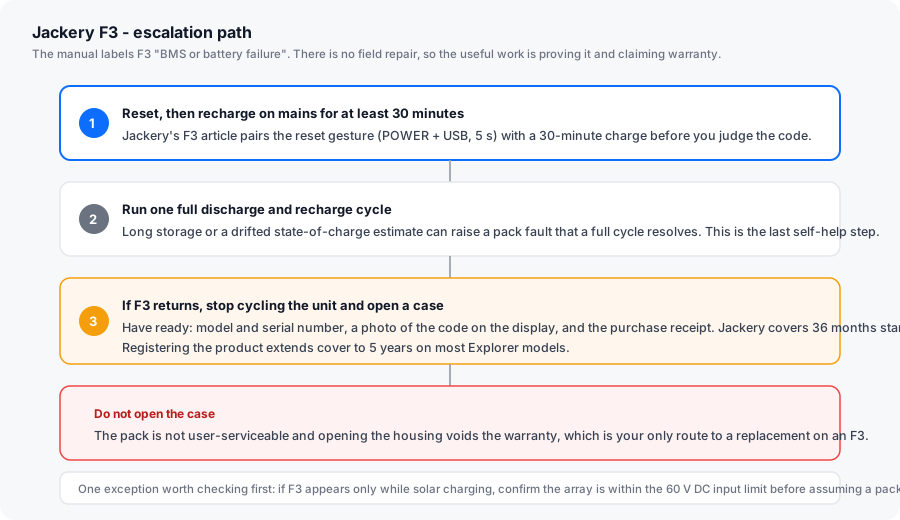
Reset, then charge for at least 30 minutes
Jackery's F3 article pairs the standard reset gesture with a minimum 30-minute charge on a standard household socket. Most Explorer units reset with POWER and USB held for 5 seconds; Pro-series models use DISPLAY and USB for 10 seconds and show 8888. Charge first, judge after.
-
Run one full discharge and recharge cycle
Take the unit down to its low-state-of-charge cutoff on a small load, then charge it back to full on mains. A long-stored unit can carry a drifted state-of-charge estimate that presents as a pack fault, and a complete cycle is the step that resolves it. This is the last thing worth trying yourself.
-
Check the input if F3 only appears on solar
Before concluding the pack has failed, confirm your array is within the manual's 60 V maximum DC input. An input-side overvoltage event can surface as a battery code. Measure open-circuit voltage cold, at the panel end.
-
Stop cycling the unit if F3 returns
If F3 comes back after a reset, a 30-minute charge and a full cycle, it is a genuine pack or BMS condition. Repeatedly resetting does not clear it and risks pushing a degraded pack harder than it should be pushed.
-
Open a warranty claim with the right evidence
Jackery asks for the model and serial number, a clear photo of the code on the display, and a description of when it first appeared. Support may also ask for a photo or short video showing the whole unit and its screen. Have the purchase receipt ready - it establishes the warranty start date.
-
Do not open the housing
The pack in an Explorer is not user-serviceable, and opening the case voids the warranty. On a code whose only resolution is replacement, that is the whole ballgame. External cleaning of the vents and keeping the ports dry are the only owner maintenance Jackery sanctions.
Which causes are fixable
| Cause | Fixable by you? | Notes |
|---|---|---|
| Drifted state-of-charge estimate after long storage | Often | A full discharge and recharge cycle is the fix. |
| Deep discharge left unaddressed for months | Sometimes | Charge on mains; if the pack will not wake, try low-current solar input. |
| Pack degradation or a weak cell | No | Warranty case. |
| BMS board fault | No | Warranty case. Recurring F3 with a full charge is the signature. |
| Input-side overvoltage surfacing as a battery code | Yes | Check array Voc against the 60 V DC input limit first. |
Warranty: what Jackery covers and for how long
Jackery’s standard warranty on Explorer power stations is 36 months from the original purchase date, extended to 5 years on most models if the product is registered after purchase. Three conditions are worth knowing before you file:
- Where you bought it matters. Jackery’s warranty applies to units bought from Jackery’s own site, Jackery-branded third-party stores, or authorised local dealers. A unit bought through an unauthorised reseller may not be covered.
- The receipt establishes the clock. The start date is the original consumer purchase date, and Jackery asks for the sales receipt or equivalent documentary proof.
- The warranty is not transferable. Cover sits with the original consumer purchaser.
The claim itself needs the serial number, which is printed under the battery flap or on the underside of the unit. Take a photo of the serial plate and a photo of the code on the display at the same time — it saves a second round trip with support.
What voids the cover
- Opening the housing for any reason, including reseating a connector.
- Modifying the firmware.
- Using non-Jackery solar connectors or an array that exceeds the input ratings.
- Water damage.
Solar wiring mistakes that damage the MPPT have historically been treated generously on a first incident, but they are technically user-caused — which is another reason to check your array voltage against the 60 V limit before you file.
When F3 is not the whole story
Two adjacent codes are worth ruling out before you accept an F3 diagnosis, because their fixes are different and much cheaper:
- F5 (battery undervoltage) — a deeply discharged pack. It looks alarming and resolves with charging. Some owners confuse the two, because both stop the unit running outputs.
- F4 (battery overvoltage) — the opposite direction, cleared by discharging.
Full definitions for all ten codes are on the Jackery error code list, including the exact wording from Jackery’s manuals.