
Bluetti AC200MAX Error Code List & Troubleshooting (2026)
Complete Bluetti AC200MAX error code list from the official manual (codes 001-055), plus diagnosis steps, B230/B300 handshake fixes, and DIY guidance.
TL;DR: The Bluetti AC200MAX reports faults through on-screen error/warning indicators, and — unlike most Bluetti models — its official user manual includes a complete numeric error code table (codes 001–055) covering input, inverter, battery/BMS, and output-lock faults. The full table with per-code actions is below. Most display-only codes clear after a proper power cycle once the underlying condition (voltage, temperature, load) is corrected. The B230/B300 handshake fault (official code 034) is almost always a dirty P090D cable connector or an expansion battery stuck in deep sleep at very low state of charge. Beware third-party “universal Bluetti code lists” — the F1–F9 tables circulating online do not come from Bluetti documentation.
The AC200MAX is the LiFePO4 successor to the original AC200P and shares a family resemblance with the AC300 in terms of fault behavior. The big behavioral difference is the expansion battery handshake: the AC200MAX can run with B230 or B300 expansion packs, and the handshake logic is stricter than the AC200P’s older protocol. If you bought your AC200MAX between 2022 and 2025 and the unit is throwing a code, this guide tells you how to diagnose the most common categories — but always confirm against the user manual for your firmware revision.
Want to calculate this for your exact setup? Use our Solar charge time calculator — it accounts for real-world losses.
How AC200MAX Error Codes Are Displayed
Codes and warnings appear on the front touchscreen, typically as a red or yellow alert region with a short text or numeric indicator. Some codes are active (flashing) and clear on their own once the underlying condition resolves; others latch and require a full power cycle. Bluetti’s official troubleshooting documentation describes the on-screen indicators and the recommended user actions for each — always consult the manual that shipped with your unit, or the latest version on the Bluetti support site, before relying on third-party code lists.
The unit will generally refuse to enable AC inverter output while a serious inverter or output-side fault is active. DC outputs (12V, USB) may continue to work because they’re on a separate converter from the main battery bus.
Official AC200MAX error code table (001–055)
Good news that most owners never hear: unlike older Bluetti models, the official AC200MAX user manual includes a full numeric error code table in its troubleshooting section. It maps 41 codes (001–055) to specific subsystems — PV and adapter input, USB and 12V output, DC bus and inverter, battery and BMS, and output-port locks. The table below reproduces every code and its official meaning, grouped by subsystem. 官方手册确认 (official AC200MAX user manual, “Troubleshooting” section).
One important caveat: the official manual lists each code and its meaning only — it does not give per-code repair instructions. The “what to do” column below compiles practical actions drawn from the manual’s general troubleshooting guidance and this guide’s model-specific sections.
To read the codes on your unit: on the homepage touchscreen, tap the Data icon and open Fault History — it lists every code and fault event the unit has generated, which is far more reliable than a screenshot moment.
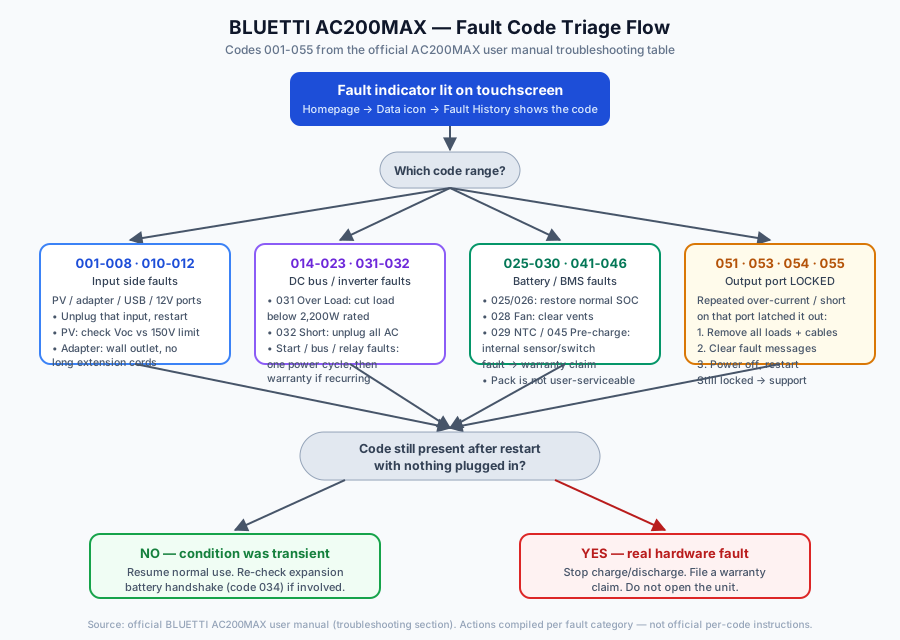
Input-side codes (001–008, 010–012)
| Code | Official meaning | What to do |
|---|---|---|
| 001 | PV Over Voltage | Reduce panels in series — Voc must stay under the 150V MPPT ceiling, which cold mornings can breach |
| 004 | DC Output Short Circuit | Unplug all DC loads, then restart |
| 005 | Adapter Over Voltage | Use the official adapter on a wall outlet; unloaded generator input often overshoots |
| 006 | Adapter Low Voltage | Check for voltage drop from long extension cords; plug in directly |
| 007 | Adapter Relay Error | Internal input relay fault — one power cycle, warranty if recurring |
| 008 | Adapter Over Current | Drop from Turbo to Standard charging, or use a dedicated circuit |
| 010 | USB/TYPE-C/PD Over Current | Unplug the USB-C/USB-A device, restart |
| 011 | 12V/10A Over Current | Reduce load on the 10A barrel port |
| 012 | 12V/30A Over Current | Reduce load on the 30A port |
DC bus and inverter codes (014–023, 031–032)
| Code | Official meaning | What to do |
|---|---|---|
| 014 | DC Start Failure | Power cycle once; recurring means converter hardware — warranty |
| 015 | DC Output Relay Error | Same as 014 — internal relay, warranty path |
| 016 | Bus Start Failure | Internal DC bus won’t spin up — power cycle, then warranty |
| 017 | Inverter Start Failure | Same category as 016; not repairable at home |
| 018 | Bus Low Voltage | Restart; recurring points to internal hardware |
| 019 | Bus High Voltage | Same handling as 018 |
| 020 | Inverter Low Voltage | Restart with no load; if it returns unloaded, warranty |
| 021 | Inverter High Voltage | Internal inverter producing out-of-spec voltage — warranty |
| 022 | Inverter Low Frequency | Update firmware first; persistent fault means mainboard |
| 023 | Inverter High Frequency | Same handling as 022 |
| 031 | Inverter Over Load | Cut total AC load below the 2,200W continuous rating |
| 032 | Inverter Short Circuit | Unplug everything; if it fires with nothing connected, warranty |
Battery and BMS codes (025–030, 041–046)
| Code | Official meaning | What to do |
|---|---|---|
| 025 | Battery High Voltage | Let the pack settle at normal SOC; solar over-voltage on cold mornings can trigger it |
| 026 | Battery Low Voltage | Recharge promptly; if below wake threshold, trickle via solar first |
| 027 | Battery Unconnected | Restart — the internal pack connection is not user-serviceable; warranty if persistent |
| 028 | Fan Error | Check fan inlets/outlets for foreign objects or blockage |
| 029 | NTC Error | Temperature sensor fault — warranty path |
| 030 | Calibration Error | Power cycle to re-run self-calibration |
| 041 | BMS Temperature Error | Move the unit within operating temperature range; recurring = sensor fault, warranty |
| 042 | BMS Over Voltage | Related to 025 — let the pack settle, verify charger |
| 043 | BMS Low Voltage | Related to 026 — recharge without delay |
| 044 | BMS Over Current | Reduce charge/discharge load; restart |
| 045 | BMS Pre-charge Failure | Internal pre-charge circuit — power cycle once, then warranty |
| 046 | BMS Output Short Circuit | Unplug everything; persistent without load = warranty |
Output-lock codes (051, 053, 054, 055)
These four are different from every code above: the port was repeatedly over-currented, overloaded, or shorted, so the system latched it off. The manual documents that a locked port retries automatically every 20 seconds and, if the fault persists, requires manual troubleshooting before it will re-enable. 官方手册确认.
| Code | Official meaning | What to do |
|---|---|---|
| 051 | AC Output Locked | Remove all AC loads → clear fault messages → power off → restart |
| 053 | USB/TYPE-C/PD Locked | Same sequence for the USB ports |
| 054 | 12V/10A Locked | Same sequence for the 10A barrel port |
| 055 | 12V/30A Locked | Same sequence for the 30A port |
If the port is still locked after a clean restart with nothing connected, stop cycling and contact Bluetti support — repeated lockouts with no load indicate a distribution-board fault.
Myths about “universal Bluetti error codes”
This is where most of the misinformation lives, so let’s be blunt:
- Myth: “F1–F9 are the universal Bluetti code list.” Multiple third-party articles circulate an F1–F9 table (F1 inverter communication, F3 battery fault, F6 inverter/AC output…) claiming it applies across Bluetti models. No Bluetti user manual we could verify uses letter-coded faults for the AC200MAX — the official table is the numeric 001–055 list above. An F-code on a different brand’s display (Jackery uses F3/F4/F5/F6/F7/F9, for example) does not transfer to a Bluetti.
- Myth: “001–055 means the same on every Bluetti model.” The AC200MAX table is model-specific. Older and newer models have different power stages, different BMS firmware, and different code spaces. Don’t read AC200MAX meanings into an AC180 or Elite 200 V2 code.
- Myth: “A full power cycle resets everything, including the fault log.” A proper power cycle clears latched display warnings; it does not erase the BMS fault history, which support can still read — relevant if a warranty dispute hinges on what happened.
- Myth: “Error code = broken unit.” Codes 001–012 and 031 are protective responses to external conditions (input out of range, load too big). Clear the condition and the code clears. Only the start/relay/sensor-family codes (007, 014–019, 029, 045) usually indicate real hardware failure on first appearance.
Input & Charging Faults
AC Input Over-Voltage / Under-Voltage
The AC200MAX accepts 100-120V AC at 60Hz on North American units and 220-240V at 50Hz on EU units. Over-voltage faults are most commonly caused by an unloaded generator with an AVR that overshoots. Under-voltage faults are typically a long, undersized extension cord causing voltage drop at the unit’s input. Disconnect the AC input, let the warning clear, then either add a small resistive load to the generator or plug directly into a wall outlet on a known-good circuit.
AC Input Over-Current / Turbo Charge Issues
If you’re using Turbo Charge mode on a shared 15A household breaker, an over-current input warning can appear. Drop to Standard charging in the menu, or move the unit to a dedicated circuit.
Solar Input Over-Voltage
The AC200MAX MPPT has a documented PV open-circuit voltage ceiling (check your model’s manual for the exact value). Panels in series can exceed that ceiling on a cold morning because crystalline silicon Voc climbs as temperature falls — a string that measures safe at 25C can spike noticeably below freezing. If you see a solar over-voltage warning, reduce the number of panels in series or move to a series-parallel configuration with an MC4 Y-branch.
Solar Input Reverse Polarity
The PV input is polarity-sensitive. If you wired MC4 connectors wrong (a common mistake when crimping replacements), the BMS will refuse to accept input. Unplug, verify polarity with a multimeter, and reconnect.
Solar Over-Current
If the PV input current is above spec, the MPPT will throttle automatically — but a persistent over-current warning often points to a short or water ingress in MC4 connectors. Inspect carefully.
DC Input (Car Charge) Over-Voltage
12V/24V car charging port faults are almost always a wrong-polarity barrel plug on a 24V truck system, or a damaged cigarette-lighter cable.
Inverter & Output Faults
Inverter Over-Voltage
The internal inverter targets 120V on the NA model. A persistent over-voltage indication on the inverter output bus is almost always an internal hardware failure — the inverter stage is producing voltage out of spec. This is not repairable at home; file a warranty claim.
Inverter Under-Voltage / Overload
The AC200MAX is rated for 2,200W continuous AC output with a higher short-term surge rating. A microwave or other appliance whose startup draw exceeds the surge rating, or whose continuous draw exceeds 2,200W, will trigger an under-voltage or overload condition. Reduce load.
Output Over-Current
This is current, not power. A 1,800W resistive load is 15A, but an inductive load with poor power factor (a window AC compressor starting, for example) can pull substantially more peak current. Always use surge specs, not running specs, when sizing loads.
Output Short Circuit
Hard short on AC output. Unplug everything. If the short-circuit warning persists with nothing plugged in, the internal AC distribution board has failed and you need a warranty repair.
Inverter Over-Temperature
The AC200MAX has cooling fans on the side of the chassis. If one fails, the inverter temperature climbs faster under load. Listen for fan noise — if a fan is not spinning, that’s your fault. Internal fan replacement voids the warranty, so contact Bluetti support.
Output Frequency Error
If the inverter’s output frequency drifts outside the tight 60Hz tolerance, a recent firmware update usually fixes it; if not, the mainboard needs replacement.
Output Channel Faults
Each AC outlet has independent monitoring. A fault on a specific outlet is almost always a load-side problem — try the same load on a different outlet first before assuming the unit has failed.
Battery & Temperature Faults
Battery Pack Over-Voltage
If the internal LiFePO4 pack voltage exceeds spec, the BMS shuts off charging. If this fires during solar charging on a cold morning, it can indicate a high cell drifting up during balancing. The AC200MAX rebalances automatically over a day or two at high SOC; leave it idle and the imbalance often resolves on its own.
Battery Pack Under-Voltage
If the pack is discharged too deeply, the unit will not turn on. You can sometimes trickle charge via solar at low current to wake the BMS. Wall charging will not work if the pack voltage is below the wake threshold — the charger refuses to engage as a protection measure.
Cell Voltage Imbalance
If the difference between the highest and lowest cell exceeds the BMS threshold, the pack still works but usable capacity is reduced. Let the unit sit at 100% SOC for several hours to let the passive balancer equalize. If imbalance warnings return within a week, you likely have a weak cell — warranty replacement is the only real fix; opening the AC200MAX voids it.
Charging Over-Temperature
If the pack is too hot during charging, move the unit to shade or reduce input power.
Charging Under-Temperature
LiFePO4 lithium plating occurs below freezing. A recent firmware update auto-blocks charging when the pack is below 0C; older firmware revisions may allow it and damage the cells. Update your firmware before you camp in winter.
Discharging Over-Temperature
A pack above its rated discharge temperature is almost never seen unless the unit is in direct sun in a sealed compartment.
Discharging Under-Temperature
If pack temperature drops well below freezing, the BMS cuts output to protect itself.
BMS Internal Fault
A generic BMS fault means the BMS microcontroller failed self-test on boot. Power cycle. If persistent, file a warranty claim.
Cell Voltage Sensor Fault
A broken cell-voltage sense wire inside the pack shows up as a sensor fault. This is internal repair only.
Communication & Expansion Battery Faults
This is where the AC200MAX diverges from the older AC200P. The expansion battery handshake is the single most-reported issue on this model.
B230/B300 Handshake Failure
The B230 and B300 expansion batteries connect via Bluetti’s P090D 8-pin connector. On power-up, the AC200MAX queries the expansion battery for its model ID, SOC, and pack voltage. If the expansion battery does not respond, the unit reports a communication fault and refuses to use the extra capacity.
Common causes, roughly in order of how frequently they appear in owner communities:
- Dirty connector pins. The P090D has gold-flash plating, not solid gold. Salt air, dust, and disconnecting under load can pit or oxidize the contacts. Clean with isopropyl alcohol on a cotton swab; a tiny dab of DeoxIT D5 helps.
- Expansion battery in deep sleep. If the B230 or B300 sat at very low SOC for a long stretch, its BMS may enter ship/sleep mode and stop responding. Wake it by connecting a solar panel directly to the expansion battery’s own PV input for several minutes — the B230 and B300 each have their own MPPT for exactly this scenario.
- Firmware mismatch. Early AC200MAX firmware does not recognize newer expansion packs. Update via the Bluetti app over Bluetooth.
- Cable damage. The P090D cable has thin conductors in a slim jacket; rodents love them. Visually inspect.
- Expansion battery BMS failure. Try the expansion battery on a known-good AC200MAX or AC300. If it doesn’t handshake there either, it’s the battery.
Diagnose B230 Handshake Error on AC200MAX
-
Power off both units
Hold the AC200MAX power button for 5 seconds until display fully blanks. Power off the B230 with its rear toggle.
-
Disconnect P090D cable
Unplug both ends. Inspect the 8 pins on the B230 port and the AC200MAX expansion port for green or black oxidation.
-
Clean contacts
Dip a cotton swab in 99% isopropyl alcohol and gently scrub each pin. Let dry 60 seconds. Apply a tiny dab of DeoxIT D5 if you have it.
-
Check B230 SOC
Power on the B230 standalone and read its display. If SOC is very low, charge it via its own solar input for at least half an hour before reconnecting.
-
Reconnect and power up
Plug the P090D cable in until it clicks. Power on the B230 first, wait several seconds, then power on the AC200MAX. The handshake should complete quickly and show total combined capacity on the AC200MAX display.
Multiple Expansion Battery Conflict
If you connect two expansion batteries with mismatched firmware versions, or mix a B230 and B300 on an AC200MAX that has not been updated to a recent firmware revision, you can see a conflict warning. Update firmware, or use matched packs.
BMS Total Capacity Issues
Bluetti’s firmware caps the total system capacity at a value documented in the user manual. Edge cases — for example, a fresh-from-factory expansion pack briefly reading slightly above its rated capacity — can produce a one-time warning that clears after a normal discharge/charge cycle.
Power Cycle: A Common First Fix
A meaningful share of display-only faults on the AC200MAX clear with a proper power cycle. The wrong way (tapping the power button) doesn’t work because the BMS stays in low-power monitoring mode.
The correct sequence:
- Unplug AC input.
- Disconnect solar input at the panel side (not at the unit — the AC200MAX’s input has capacitors that hold residual voltage).
- Disconnect any expansion battery via P090D.
- Hold the DC button for 10 seconds. Display goes black.
- Wait 30 seconds.
- Press DC once to power on. The unit boots fresh with all latched faults cleared.
If a code returns within 10 seconds of power-on, the fault is real and ongoing. If it takes more than a minute, the underlying condition (temperature, voltage, etc.) needs to recover first.
Firmware Update Procedure
A recent firmware update from Bluetti has eliminated or improved many error conditions, particularly around expansion-battery handshake and cold-weather charging cutoff behavior. Update via the Bluetti app over Bluetooth. Keep the AC200MAX comfortably charged during the update — interrupting a firmware flash can brick the mainboard and require a board swap, so do not start an update on a near-empty unit.
When to Stop DIY and Claim Warranty
Bluetti’s standard warranty on the AC200MAX is 2 years. Stop troubleshooting and file a claim if:
- A pack, BMS, or cell-imbalance warning reappears within a week of “fixing” it
- Inverter over-voltage, short-circuit, or frequency faults fire with nothing plugged in
- The unit smells like burned electronics or fishy electrolyte
- The pack will not wake after an extended solar trickle attempt
- You see physical bulging on the AC200MAX case
Opening the case voids the warranty. The pack is glued, not screwed, and replacement cells without spot-welding equipment is not realistic for most owners.
For broader Bluetti troubleshooting across the lineup (AC180, AC300, EB70, Elite 200 V2), see our complete Bluetti troubleshooting guide which catalogs cross-model patterns and shared firmware issues.
Quick Reference: Fault Categories
If you only remember one thing, fault behavior on the AC200MAX falls into a small number of subsystems:
- Input side — wall AC, solar, or car-charge input voltage/current/polarity issues
- Inverter and AC output — over-voltage, under-voltage, overload, short, over-temp, frequency
- Battery pack and temperature — cell over/under-voltage, imbalance, charge or discharge temperature limits
- Communication — expansion battery handshake and conflicts
With those categories in mind, and the on-screen diagnostic information your firmware provides, most owners can self-diagnose the most common situations in under 10 minutes. For anything you can’t pin down, lean on Bluetti support — they can decode the exact internal fault state remotely.
Still deciding on a replacement or expansion?
- Bluetti: current models & specs — AC200MAX successors and expansion options.
- Bluetti vs EcoFlow vs Anker Solix — how the ecosystem compares.
- Compare power stations — spec-by-spec across models.